Sticky vs Rotating Proxies: When Each Type Actually Matters
Your checkout keeps failing at the payment step. You've tried different proxies, but nothing works. The issue isn't proxy quality, it's whether your proxy behavior matches what the site validates. Sites check IP consistency, request patterns, or both. Test what your target site validates, then choose sticky or rotating accordingly. You'll see how to validate site requirements, avoid common mistakes, and pick the right strategy for eCommerce checkouts, web scraping, social media management, and API integration. Here's the testing process.

Gunnar
Last updated -
Proxies

Quick decision matrix
Your Use Case | Recommended Type | Key Reason |
Multi-step checkout (eCommerce, sneaker bots) | Sticky | Sites validate IP consistency during payment |
High-volume web scraping (10,000+ requests) | Rotating | Distribute across per-IP rate limits |
Social media account management | Sticky | Prevent security flags from IP changes |
SERP scraping (Google, Bing) | Rotating | Search engines enforce strict per-IP limits |
API with session tokens | Sticky | Some APIs bind sessions to IP addresses |
Price monitoring across retailers | Rotating | Independent requests, no session state |
Test method: Switch IPs mid-session. If authentication breaks, use sticky. If it works, rotating is safe.
The core decision: what does your target site validate?
Sticky proxies maintain the same IP throughout your session. Use them when sites validate IP consistency as part of session security.
Rotating proxies change IPs per request or at intervals. Use them when you need to distribute independent requests across multiple IPs to avoid per-IP rate limits.
The choice isn't about proxy features. It's about matching your proxy behavior to the site's validation requirements.
Example – Testing the difference:
import requests |
Testing what sites actually validate
Before committing to a strategy, test whether the target site validates IP consistency during sessions. Here's how: authenticate with one proxy, capture your session cookie, then switch to a different proxy mid-session and attempt an authenticated request.
If the request succeeds, the site likely doesn't validate IP consistency for this workflow, and rotation should work. If it fails with authentication errors or session timeouts, you need sticky proxies for that workflow.
This typically takes under a minute to test manually, but it eliminates hours of assumption-based debugging.
Validate your proxies before deployment: Use the HypeProxies Proxy Checker to check fraud scores and detection flags.
When do you actually need sticky proxies?
Sticky proxies matter specifically when target sites bind session state to the originating IP address as part of their security model. Here's where this validation pattern appears most frequently.
eCommerce checkout flows
When you're doing automated purchasing, maintain IP consistency throughout the entire flow. If your IP changes between cart and checkout, many sites reset your session.
The third time I debugged a checkout failure at the exact same step, I finally understood what was happening. The site wasn't rejecting the proxy. It was validating that my IP remained consistent throughout the purchase flow.
The moment my rotation logic switched IPs between adding to cart and completing payment, the session invalidated. Once I understood this validation pattern, the fix was obvious: use sticky proxies for the entire checkout sequence.
Important consideration: Session timeouts occur regardless of IP stability. Most sites expire sessions after 15-30 minutes of inactivity. Sticky proxies prevent mid-session IP changes from breaking the flow, but they don't extend session lifetime. Plan workflows to complete within typical session windows.
Social media and account management
Platforms like Instagram, Twitter, LinkedIn, and Facebook monitor for suspicious IP patterns as indicators of compromised accounts.
Rapid IP changes trigger security responses: password resets, 2FA challenges, or account locks.
If you're managing multiple accounts, assign one sticky proxy per account and maintain that mapping consistently.
API authentication patterns
Some APIs implement rate limiting and session validation based on the authenticated session rather than per-IP. In these cases, rotating IPs gives you no rate limit benefit and potentially breaks the authentication flow if the API validates IP consistency for security.
Working with ISP proxies gets you the combination of residential IP trust signals with data center reliability. You get stable connections for session-based workflows without the connection instability that sometimes affects pure residential proxy pools.
When rotating proxies address scale requirements
Rotating proxies work when requests are completely independent, and the primary constraint is per-IP rate limiting. Here's where this approach delivers real value.
High-volume web scraping
When scraping tens of thousands of pages, single-IP approaches hit rate limits quickly.
Most sites limit 10-100 requests per hour per IP.
With rotating proxies, you distribute those requests across your pool. If you have 100 proxies and the site limits 100 requests per hour per IP, you can handle 10,000 requests per hour.
The key requirement: Each request must be truly independent. No session cookies, no authentication state.
Critical limitation: Rotating IPs only addresses per-IP rate limits.
If the target site implements rate limiting based on other factors (authenticated account limits, browser fingerprinting, request pattern analysis), rotation alone typically won't prevent limiting.
Understanding the actual rate limiting mechanism matters more than the rotation strategy.
Search Engine Result Page (SERP) scraping
Search engines implement aggressive per-IP rate limits. Google typically blocks IPs making 100+ requests per hour without proper delays, though limits vary based on proxy quality and request patterns.
Since each search query is independent (no session state to maintain across searches), rotating IPs works well for this use case.
Price monitoring and market research
eCommerce price monitoring requires repeated checks of the same products across multiple retailers. Each price check is an independent HTTP request with no session state, making this workflow naturally suitable for rotation.
Check out the Playwright, Selenium, Scrapy, and Python requests integration guides for framework-specific implementation details.
Need help with implementation? Join the HypeProxies Discord community for proxy strategies and troubleshooting.
4 mistakes that break proxy workflows
Assuming rotation solves all rate limiting
The most frequent mistake: assuming IP rotation bypasses all rate limiting when the actual limitation is account-based, fingerprint-based, or pattern-based.
Test your assumption. If you're getting rate-limited despite rotating IPs, the rate limit isn't based on IP.
Session state leakage
Reusing session objects while rotating proxies causes cookies from previous requests to persist and leak to new IP addresses, creating inconsistent behavior.
When rotating, each request needs a truly isolated state. No shared cookies, no persisted authentication tokens, no connection pooling that might reuse TCP connections across IP changes.
Geographic inconsistencies
Rotating across different geographic regions causes inconsistent responses. Different pricing, different product availability, different content localization.
A product might show as in-stock from a California IP but out-of-stock from a Texas IP due to regional inventory.
Filter your proxy pool by required geography before deployment to ensure response consistency.
Not validating proxy quality
Using proxies without validating their reputation leads to immediate blocks on protected sites. The HypeProxies Proxy Checker shows fraud scores, ASN information, and detection flags for each IP address.
An IP with a fraud score of 75 from a legitimate Tier-1 ISP network (like AT&T) will work on most sites despite detection flags because it originates from a trusted network.
But an IP with the same fraud score from a data center ASN (AWS, DigitalOcean) often gets blocked more quickly because many sites flag data center ranges.
Pre-filtering your proxy pool by fraud score and ASN type before deployment prevents wasted debugging time.
Avoid these mistakes: Check the Help Center for troubleshooting guides and best practices.
What detection methods do sites use (beyond IP)?
Your IP address isn't the only thing sites check.
ASN (Autonomous System Number). Data center ranges like AWS and DigitalOcean get blocked constantly. ISP networks like AT&T and Frontier pass through because they look like regular consumer traffic. That's the advantage of ISP proxies.
TLS fingerprinting. Your HTTP library leaves a unique TLS handshake signature. Sites match this against known browser profiles. Rotating IPs won't fix a bad TLS fingerprint.
Request patterns. Perfectly consistent timing flags you as automation. Real users don't request every 3 seconds with identical headers. Sites also look for predictable session durations and identical header ordering.
Geolocation inconsistencies. If your IP says California but your browser timezone says New York, that's suspicious. Same with language headers that don't match your IP's region, or currency preferences that conflict with location.
Decision framework
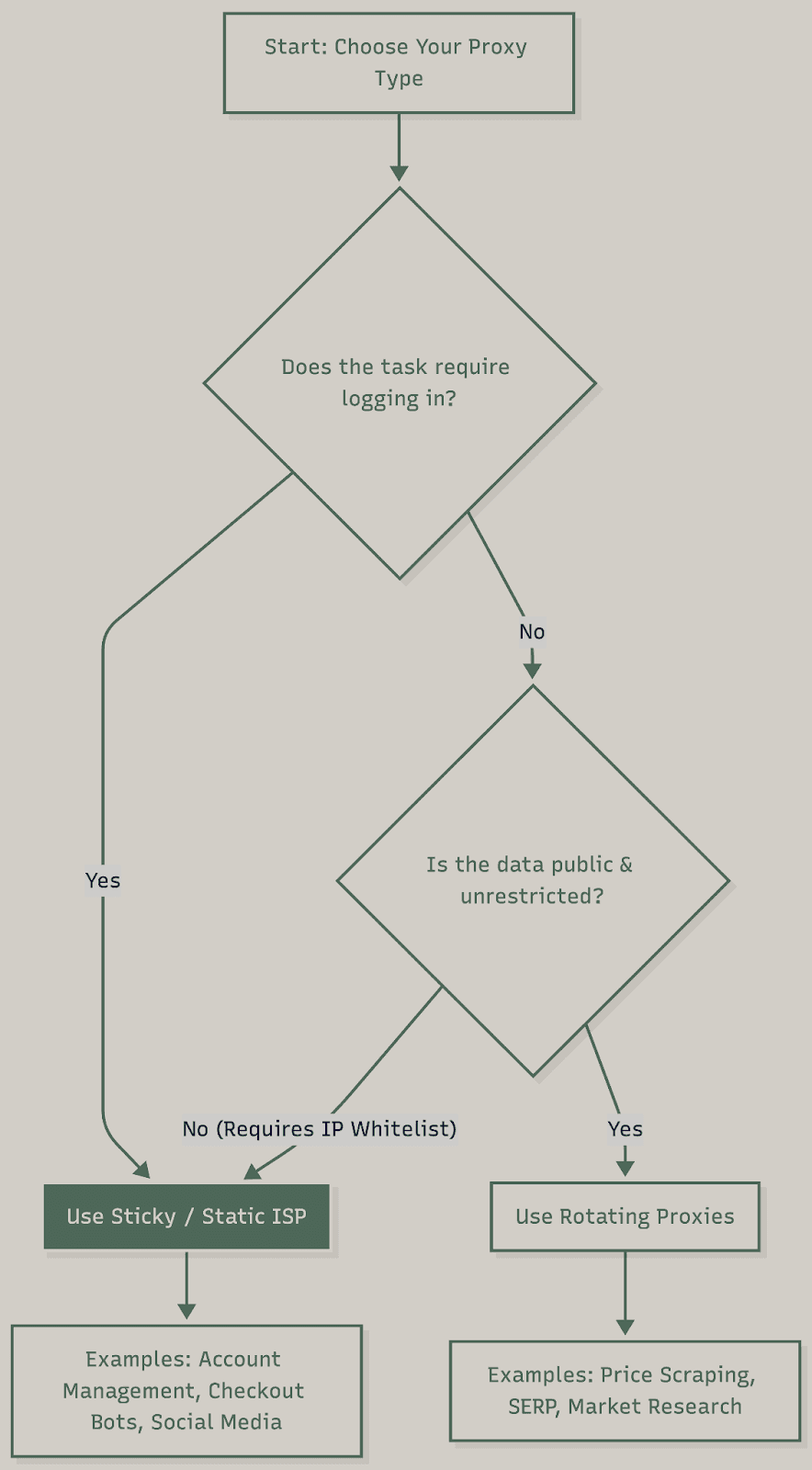
Use sticky proxies when:
The target site validates IP consistency during sessions. Test by switching IPs mid-session. If it breaks authentication or resets state, use sticky.
Use rotating proxies when:
Requests are completely independent with no session state, and you're hitting per-IP rate limits. Test by confirming rate limits are actually per-IP. If you're still limited while rotating, the constraint isn't IP-based.
Hybrid approaches work when:
Your workflow has distinct phases with different requirements. Example: rotate during discovery (scraping search results), then switch to sticky for extraction (authenticating and pulling data).
Validation before production
Before you go to production, verify these assumptions:
IP consistency. Make several consecutive requests through the same proxy and check the IP actually stays the same. Some providers advertise "sticky" behavior but rotate IPs unpredictably.
Session persistence. Authenticate, wait 5-10 minutes, then try an authenticated request. Sessions might timeout faster than you expect.
Geographic accuracy. Verify IP geolocation matches your requirements. Wrong location means wrong pricing and content, which breaks data consistency.
Fraud scores. IP reputation degrades over time as other users share the same addresses. Check scores regularly, not just once.
Test in staging environments before major campaigns. Production failures are expensive to fix.
Common issues & quick fixes
"My rotating proxies still get rate limited"
The rate limit isn't per-IP. Check for account-based limits, browser fingerprint tracking, or request pattern analysis. Test by monitoring rate limits with different accounts on the same IP.
"Sessions break randomly with sticky proxies"
Your proxy provider might not actually maintain IP consistency. Verify by making consecutive requests and checking the IP address remains constant throughout the session.
"Checkout fails at payment step despite using proxies"
Your IP changed mid-session between cart and payment. Use sticky proxies for the entire checkout flow, not just individual steps.
"Geographic targeting doesn't work as expected"
Verify your proxy's actual geolocation matches requirements. Some proxy providers show incorrect location data. Use IP geolocation tools to confirm before deployment.
"Proxies work in testing but fail in production"
Fraud scores degrade over time as multiple users share IPs. Pre-production validation doesn't guarantee long-term performance. Implement ongoing fraud score monitoring.
Making the right choice
The sticky versus rotating decision depends on what the target site validates. Test your assumptions instead of guessing. Observe whether sessions persist across IP changes. Verify whether rate limits are per-IP or based on other factors.
Most proxy issues stem from architectural mismatches between the implementation and site validation logic, not from the proxies themselves. Understanding what you're actually working against matters more than the proxy type.
Need implementation details for your development stack? Check out the integration guides for Python, Playwright, Selenium, and Scrapy.
Looking for reliable ISP proxies with transparent fraud scoring and true Tier-1 ISP networks? Visit HypeProxies or consult the Help Center.
Frequently asked questions
When should I use sticky proxies versus rotating proxies?
Use sticky proxies when the target site validates IP consistency during sessions (typically for authentication flows, multi-step checkouts, or account management). Use rotating proxies for independent requests at high volume where per-IP rate limits are the primary constraint. The simplest test: try switching IPs mid-session. If it breaks your workflow, you need sticky.
Why do ISP proxies perform better than residential or data center proxies?
ISP proxies use IP addresses allocated to Internet Service Providers (Tier-1 carriers like AT&T, Frontier) rather than data centers or consumer connections. This gives you data center-like speed with residential-like trust signals. Sites treat ISP addresses as legitimate consumer traffic rather than obvious proxy traffic from data center ranges.
How many rotating proxies do I need for a given scraping volume?
Calculate based on the target site rate limits and your request volume. If the site limits 100 requests per hour per IP and you need 10,000 requests per hour, you need at least 100 IPs. Add 20-30% buffer to account for proxy failures and quality variations. In practice, start with your calculated minimum and monitor for rate limiting. Scale up if needed.
Can rotating proxies bypass all types of rate limiting?
No. Only per-IP rate limits specifically. Account-based limits, browser fingerprint tracking, and request pattern analysis require different solutions. Test to confirm what the site actually tracks.
Share on

$1 one-time verification. Unlock your trial today.
Stay in the loop
Subscribe to our newsletter for the latest updates, product news, and more.
No spam. Unsubscribe at anytime.