How to Monitor Amazon Product Price with Python using ISP Proxies
In this tutorial, we have built a system to manage Amazon pricing. Behind the scenes, we have used ISP proxies.
Gunnar
Last updated -
Proxies
In this article:
Title
Overview
In our small-sample testing, curl_cffi with impersonate="chrome" produced 10 successful fetches in 10 attempts against live Amazon product pages; the standard requests library returned CAPTCHA pages on 2 of 3 attempts in the same setup.
TLS impersonation.curl_cffi matches the Chrome TLS handshake, so requests are less likely to produce a fingerprint Amazon recognizes as automated.
Monthly cost. Around $70 ($65 for an entry-tier ISP proxy plan, $5 for a VPS), or around $65 on a free hosting tier such as Oracle Cloud's Always Free resources. The pricing here reflects HypeProxies' Pro plan; other providers will be in a similar range.
ISP versus datacenter proxies. Amazon classifies IPs by Autonomous System Number, or ASN (the network operator that owns each IP block). Datacenter ASNs such as AWS or OVH are challenged on most requests; consumer-ISP ASNs are challenged far less often.
Price extraction. The parser reads a JSON pricing blob that Amazon embeds in each product page, with CSS selectors as a fallback. This is more stable across DOM refactors than CSS-only parsing.
Sequential limit. Around 300 products at hourly cadence with sequential fetches; the ceiling scales further with async and a larger IP pool. To exceed it, replace the loop with curl_cffi.AsyncSession and asyncio.gather().
This guide targets amazon.com. For other Amazon storefronts (amazon.de, amazon.co.uk, etc.), use proxies from the matching region, update the URL in fetch_product_page, and adjust the currency-symbol stripping in extract_price_text (the parser currently handles USD).
Suitable for: monitoring up to a few hundred products at hourly cadence (or several thousand at slower cadences; see the cycle limits in the Scaling and adapting section). The implementation relies on the static HTML that Amazon serves on product pages.
Not suitable for: products whose prices render only after a JavaScript variant selection (such as some Echo or Kindle pages); for these, use a headless browser with anti-detection features. Nodriver (Chrome-based), Camoufox (a stealth Firefox build), and SeleniumBase (with UC Mode) are common choices. Also not suitable for one-time bulk scrapes of 100,000 or more products in a single run, where rotating residential proxies are typically cheaper for that specific workload. ISP proxies are designed for recurring monitoring; rotating residential proxies are designed for bulk extraction. The two are different products for different jobs.
This guide does not use the Amazon Product Advertising API. The API requires signing up for the affiliate program, has rate limits that make multi-product monitoring difficult, and returns a smaller set of pricing data than the public product page. For ongoing price monitoring at the scale described here, scraping the public HTML is more practical.
Prerequisites
End-to-end setup takes 30 to 45 minutes once ISP proxies are available.
Python 3.10 or newer and a machine that runs continuously. A small rented Linux server (a Virtual Private Server, or VPS) at around $5 per month is enough; alternatives are covered in the Deploy continuously section.
An ISP proxy pool. An ISP proxy (sometimes called a static residential proxy) is a fixed IP address, owned by a consumer ISP such as AT&T or Frontier. This rules out two common alternatives: datacenter IPs and rotating residential pools that change addresses every few minutes. We use HypeProxies ISP proxies (around $65 per month for 50 IPs, unlimited bandwidth), but any reputable provider with consumer-ISP IPs works. ISP proxies are strongly recommended because Amazon's anti-bot system classifies IP ranges by ASN. Datacenter ASNs such as AWS, OVH, Hetzner, or DigitalOcean are challenged or blocked on most requests; consumer-ISP ASNs are challenged far less often.
A note on per-IP pricing. Amazon product pages are 200 to 500 KB each, and a 100-product hourly monitor pulls around 25 GB per month. At residential per-GB proxy rates ($7 to $10 per GB), this is $175 to $250 per month in bandwidth alone, before the base subscription. ISP proxies are billed per IP, which keeps the cost flat no matter the traffic volume. Most reputable providers using this pricing model behave the same way.
Each library handles a specific concern: curl_cffi for TLS impersonation, beautifulsoup4 and lxml for HTML parsing, tenacity for retry logic, loguru for structured logging, pydantic for configuration validation, tinydb for the price-history file, apprise for multi-channel alerts, and schedule for the cron loop.
On the choice of curl_cffi. Amazon checks the TLS handshake fingerprint of incoming requests. The Python requests library produces a recognizable urllib3 fingerprint, and in our small-sample testing it returned CAPTCHA pages on roughly 2 of 3 attempts, even on high-quality proxies. curl_cffi impersonates the full Chrome request signature: TLS handshake, HTTP/2 settings, and default headers. It exposes the same API as requests, so only the import statement changes. Avoid manually setting User-Agent or other headers, since the impersonation handles them and overrides can break the match.
Step 2 – Configure proxies and products
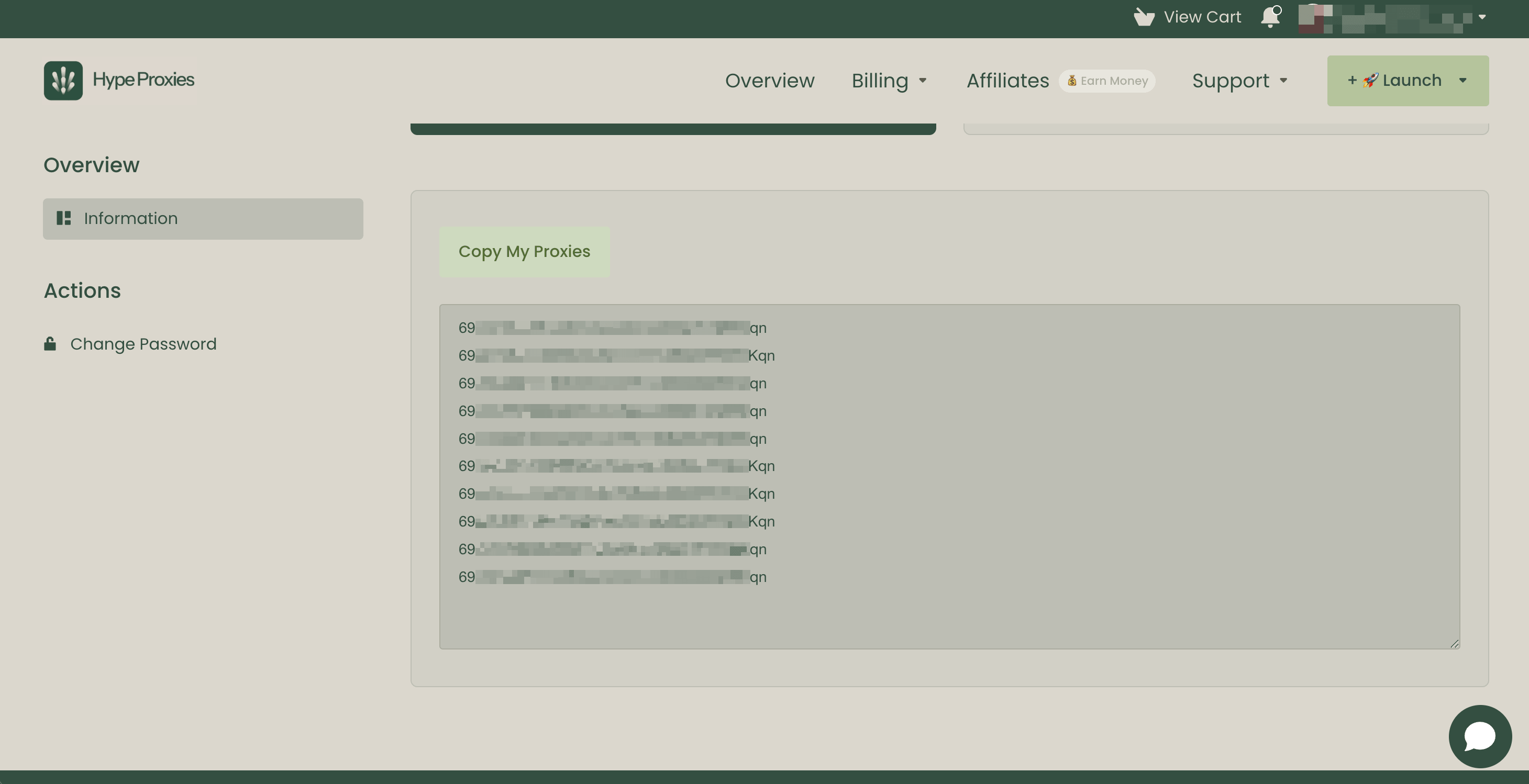
If you do not already have ISP proxies, sign up with a provider and get your credentials. HypeProxies and most other reputable ISP-proxy providers offer them in IP:PORT:USERNAME:PASSWORD format, ready to paste into your configuration.
What to look for when choosing a provider:
Static IPs, not "rotating residential" sessions that return a different IP every few minutes. Static IPs build reputation with Amazon over time and trigger fewer challenges than rotating IPs.
US-based, owned by a consumer ISP. Check the ASN with whois <ip> or a service such as ipinfo.io. Frontier, AT&T, and RCN are consumer-ISP networks; AWS or OVH are datacenter networks, which Amazon will flag.
Unlimited bandwidth pricing, billed per IP rather than per GB. Per-GB pricing scales rapidly with traffic, which gets expensive for hourly monitoring.
Before purchasing, run a candidate provider's IPs through a fraud-score checker to confirm they are real consumer-ISP proxies, not datacenter IPs labeled as residential. The HypeProxies proxy checker returns fraud score, ASN, hostname, geolocation, and VPN/Tor detection in one result. IPQualityScore and Whoer are also free options.
Create config.py. Pydantic validates your configuration at load time, so a mistyped ASIN fails before any proxy requests are made.
# config.pyfrom urllib.parseimportquotefrompydantic import BaseModel, field_validator
class ProxyConfig(BaseModel):
host:str
port:str
user:str
password:str
@propertydef url(self):
# quote()escapes special charactersincredentials suchas @,:,/, #returnf"http://{quote(self.user, safe='')}:{quote(self.password, safe='')}@{self.host}:{self.port}"class ProductConfig(BaseModel):
asin:str
name:str
target_price:float
@field_validator("asin")
@classmethoddef validate_asin(cls,v):iflen(v) != 10:raise ValueError("ASIN must be exactly 10 characters")returnv
# Replace withyour own proxy credentialsPROXIES = [ProxyConfig(host="proxy1.example.com",port="8000",user="your_username",password="your_password"),ProxyConfig(host="proxy2.example.com",port="8001",user="your_username",password="your_password"),ProxyConfig(host="proxy3.example.com",port="8002",user="your_username",password="your_password"),ProxyConfig(host="proxy4.example.com",port="8003",user="your_username",password="your_password"),ProxyConfig(host="proxy5.example.com",port="8004",user="your_username",password="your_password"),]REQUEST_TIMEOUT = 15MAX_RETRIES = 3
# config.pyfrom urllib.parseimportquotefrompydantic import BaseModel, field_validator
class ProxyConfig(BaseModel):
host:str
port:str
user:str
password:str
@propertydef url(self):
# quote()escapes special charactersincredentials suchas @,:,/, #returnf"http://{quote(self.user, safe='')}:{quote(self.password, safe='')}@{self.host}:{self.port}"class ProductConfig(BaseModel):
asin:str
name:str
target_price:float
@field_validator("asin")
@classmethoddef validate_asin(cls,v):iflen(v) != 10:raise ValueError("ASIN must be exactly 10 characters")returnv
# Replace withyour own proxy credentialsPROXIES = [ProxyConfig(host="proxy1.example.com",port="8000",user="your_username",password="your_password"),ProxyConfig(host="proxy2.example.com",port="8001",user="your_username",password="your_password"),ProxyConfig(host="proxy3.example.com",port="8002",user="your_username",password="your_password"),ProxyConfig(host="proxy4.example.com",port="8003",user="your_username",password="your_password"),ProxyConfig(host="proxy5.example.com",port="8004",user="your_username",password="your_password"),]REQUEST_TIMEOUT = 15MAX_RETRIES = 3
# config.pyfrom urllib.parseimportquotefrompydantic import BaseModel, field_validator
class ProxyConfig(BaseModel):
host:str
port:str
user:str
password:str
@propertydef url(self):
# quote()escapes special charactersincredentials suchas @,:,/, #returnf"http://{quote(self.user, safe='')}:{quote(self.password, safe='')}@{self.host}:{self.port}"class ProductConfig(BaseModel):
asin:str
name:str
target_price:float
@field_validator("asin")
@classmethoddef validate_asin(cls,v):iflen(v) != 10:raise ValueError("ASIN must be exactly 10 characters")returnv
# Replace withyour own proxy credentialsPROXIES = [ProxyConfig(host="proxy1.example.com",port="8000",user="your_username",password="your_password"),ProxyConfig(host="proxy2.example.com",port="8001",user="your_username",password="your_password"),ProxyConfig(host="proxy3.example.com",port="8002",user="your_username",password="your_password"),ProxyConfig(host="proxy4.example.com",port="8003",user="your_username",password="your_password"),ProxyConfig(host="proxy5.example.com",port="8004",user="your_username",password="your_password"),]REQUEST_TIMEOUT = 15MAX_RETRIES = 3
Createproducts.json to list the products to monitor:
{"products":[{"asin":"B07MHJFRBJ","name":"Bounty Paper Towels","target_price":22.00},{"asin":"B00NTCH52W","name":"Amazon Basics AA Batteries","target_price":8.99},{"asin":"B0CP9YB3Q4","name":"Stanley Quencher Tumbler","target_price":20.00},{"asin":"B0BZYCJK89","name":"Owala FreeSip Water Bottle","target_price":25.00}]}
{"products":[{"asin":"B07MHJFRBJ","name":"Bounty Paper Towels","target_price":22.00},{"asin":"B00NTCH52W","name":"Amazon Basics AA Batteries","target_price":8.99},{"asin":"B0CP9YB3Q4","name":"Stanley Quencher Tumbler","target_price":20.00},{"asin":"B0BZYCJK89","name":"Owala FreeSip Water Bottle","target_price":25.00}]}
{"products":[{"asin":"B07MHJFRBJ","name":"Bounty Paper Towels","target_price":22.00},{"asin":"B00NTCH52W","name":"Amazon Basics AA Batteries","target_price":8.99},{"asin":"B0CP9YB3Q4","name":"Stanley Quencher Tumbler","target_price":20.00},{"asin":"B0BZYCJK89","name":"Owala FreeSip Water Bottle","target_price":25.00}]}
Step 3 – Verify your proxies
Before writing any scraping logic, make sure the proxies are reachable and that your pool returns different IPs. Most "Amazon is blocking me" reports are caused by a single failing proxy in the pool, not by Amazon itself.
One line per proxy, all returning different IPs (your IPs will be different from the example). Sub-2-second responses are typical. If any line says FAILED, fix that line before continuing. The usual cause is a typo in the credentials, or a port that the provider has not yet activated.
Step 4 – Build the scraper
The scraper handles TLS impersonation, proxy rotation, selective retry, and price extraction. The implementation is organized in three sections within scraper.py: imports and selectors, the fetcher, and the parsing entry point.
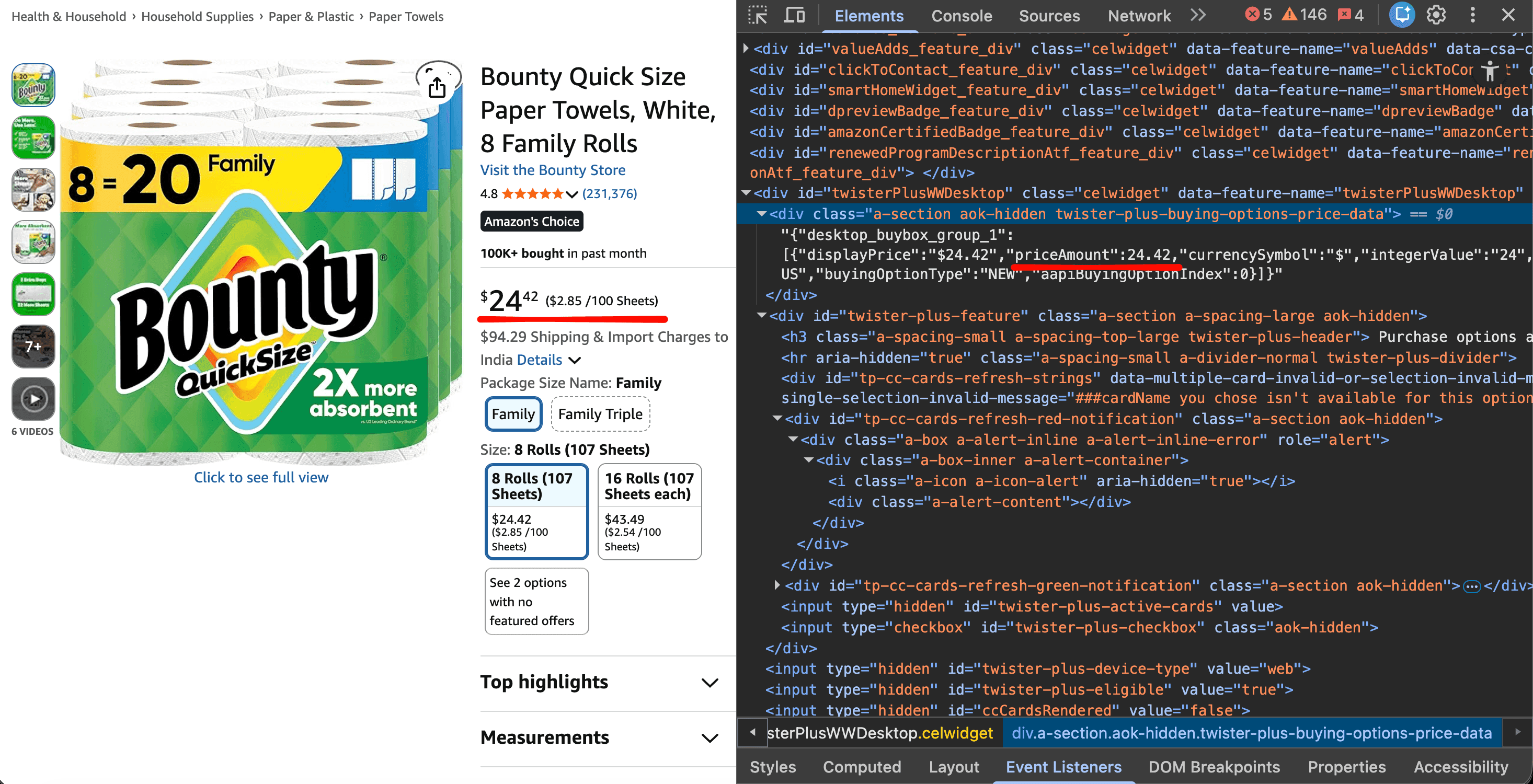
Most Amazon web scraping tutorials parse prices using CSS selectors only (span.a-price .a-offscreen and similar), which may break when Amazon refactors the DOM. The approach used here is more stable: Amazon embeds a JSON pricing blob in a hidden <div> on most product pages. The scraper reads that first and falls back to CSS selectors only when the JSON is missing.
Imports, data model, and selectors
# scraper.pyimportjsonimportreimportrandomimporttimefromdatetime import datetime
from itertools importcyclefromcurl_cffi import requests as curl_requests
from bs4 importBeautifulSoupfromtenacity import retry, stop_after_attempt, wait_random, retry_if_exception_type
from loguru importloggerfrompydantic import BaseModel, Field
from config importPROXIES,REQUEST_TIMEOUT,MAX_RETRIESclass PriceResult(BaseModel):
asin:str
title:str
price:float | None = None
availability:str = "Unknown"
rating:str | None = None
timestamp:datetime = Field(default_factory=datetime.now)class RetryableError(Exception):"""Temporary server-side error or anti-bot challenge.
Raising thissignals the retry decorator to tryagain withthe nextproxyinthe pool. Permanenterrors raise a plain Exception instead.
"""
# Amazon embeds price dataina hidden div on most product pages,inthis format:
# {"desktop_buybox_group_1":[{"priceAmount":24.42,"buyingOptionType":"NEW",...}]}
# This is more reliable than CSS selectors because Amazon's variant-picker UI
# (called "twister"internally,hence the class name) depends on it.
PRICE_JSON_SELECTOR = ".twister-plus-buying-options-price-data"
# Usedas fallback when the JSON data above is missing on a given page.
PRICE_SELECTORS = ["span.a-price .a-offscreen",".priceToPay .a-offscreen","#corePriceDisplay_desktop_feature_div .a-offscreen",]def extract_price_text(tag):iftag is None:returnNonetext = tag.get_text(strip=True)ifnot text:returnNonetry:returnfloat(text.replace("$","").replace(",",""))except ValueError:returnNone
# scraper.pyimportjsonimportreimportrandomimporttimefromdatetime import datetime
from itertools importcyclefromcurl_cffi import requests as curl_requests
from bs4 importBeautifulSoupfromtenacity import retry, stop_after_attempt, wait_random, retry_if_exception_type
from loguru importloggerfrompydantic import BaseModel, Field
from config importPROXIES,REQUEST_TIMEOUT,MAX_RETRIESclass PriceResult(BaseModel):
asin:str
title:str
price:float | None = None
availability:str = "Unknown"
rating:str | None = None
timestamp:datetime = Field(default_factory=datetime.now)class RetryableError(Exception):"""Temporary server-side error or anti-bot challenge.
Raising thissignals the retry decorator to tryagain withthe nextproxyinthe pool. Permanenterrors raise a plain Exception instead.
"""
# Amazon embeds price dataina hidden div on most product pages,inthis format:
# {"desktop_buybox_group_1":[{"priceAmount":24.42,"buyingOptionType":"NEW",...}]}
# This is more reliable than CSS selectors because Amazon's variant-picker UI
# (called "twister"internally,hence the class name) depends on it.
PRICE_JSON_SELECTOR = ".twister-plus-buying-options-price-data"
# Usedas fallback when the JSON data above is missing on a given page.
PRICE_SELECTORS = ["span.a-price .a-offscreen",".priceToPay .a-offscreen","#corePriceDisplay_desktop_feature_div .a-offscreen",]def extract_price_text(tag):iftag is None:returnNonetext = tag.get_text(strip=True)ifnot text:returnNonetry:returnfloat(text.replace("$","").replace(",",""))except ValueError:returnNone
# scraper.pyimportjsonimportreimportrandomimporttimefromdatetime import datetime
from itertools importcyclefromcurl_cffi import requests as curl_requests
from bs4 importBeautifulSoupfromtenacity import retry, stop_after_attempt, wait_random, retry_if_exception_type
from loguru importloggerfrompydantic import BaseModel, Field
from config importPROXIES,REQUEST_TIMEOUT,MAX_RETRIESclass PriceResult(BaseModel):
asin:str
title:str
price:float | None = None
availability:str = "Unknown"
rating:str | None = None
timestamp:datetime = Field(default_factory=datetime.now)class RetryableError(Exception):"""Temporary server-side error or anti-bot challenge.
Raising thissignals the retry decorator to tryagain withthe nextproxyinthe pool. Permanenterrors raise a plain Exception instead.
"""
# Amazon embeds price dataina hidden div on most product pages,inthis format:
# {"desktop_buybox_group_1":[{"priceAmount":24.42,"buyingOptionType":"NEW",...}]}
# This is more reliable than CSS selectors because Amazon's variant-picker UI
# (called "twister"internally,hence the class name) depends on it.
PRICE_JSON_SELECTOR = ".twister-plus-buying-options-price-data"
# Usedas fallback when the JSON data above is missing on a given page.
PRICE_SELECTORS = ["span.a-price .a-offscreen",".priceToPay .a-offscreen","#corePriceDisplay_desktop_feature_div .a-offscreen",]def extract_price_text(tag):iftag is None:returnNonetext = tag.get_text(strip=True)ifnot text:returnNonetry:returnfloat(text.replace("$","").replace(",",""))except ValueError:returnNone
PriceResult is the validated data model the scraper returns. Pydantic catches malformed data at the parsing boundary, rather than letting it spread three function calls deeper. RetryableError identifies the exceptions tenacity should retry; other exceptions stop the retry loop. PRICE_JSON_SELECTOR targets the embedded JSON blob; PRICE_SELECTORS is the CSS fallback chain.
The fetcher: TLS impersonation, proxy rotation, selective retry
class AmazonPriceScraper:
def __init__(self):self._proxy_pool = cycle(PROXIES)def _get_next_proxy(self):returnnext(self._proxy_pool).url
@retry(stop=stop_after_attempt(MAX_RETRIES),wait=wait_random(min=3,max=10),retry=retry_if_exception_type(RetryableError),)def fetch_product_page(self,asin):url = f"<https://www.amazon.com/dp/{asin}>"proxy = self._get_next_proxy()response = curl_requests.get(url,proxy=proxy,timeout=REQUEST_TIMEOUT,impersonate="chrome",)
# 404means the product page is gone. Skipit without retrying.
ifresponse.status_code == 404:logger.warning(f"Product {asin} not found (404)")returnNone
# 429(rate limited)and 5xx(server errors)are temporary. Retry.
ifresponse.status_code == 429:raise RetryableError(f"Rate limited (429) for {asin}")if500 <= response.status_code < 600:raise RetryableError(f"Server error {response.status_code} for {asin}")
# Other 4xx codes(403 Forbidden,410Gone,and so on)are permanent.
# Raisea plain Exception so the retry loop stops at the first attempt.
ifresponse.status_code != 200:raise Exception(f"Permanent HTTP error {response.status_code} for {asin}")
# Amazon serves several block-page variants when it detects automation.
# The"dog page"carries an API support email;the soft challenge shows
# a captcha validation URL or asks the user to type characters.
body_lower = response.text.lower()if"api-services-support@amazon.com"inresponse.text:raise RetryableError(f"Amazon dog-page CAPTCHA for {asin}")if"/errors/validatecaptcha"inbody_lower or "type the characters you see"inbody_lower:raise RetryableError(f"Soft CAPTCHA challenge for {asin}")returnresponse.text
class AmazonPriceScraper:
def __init__(self):self._proxy_pool = cycle(PROXIES)def _get_next_proxy(self):returnnext(self._proxy_pool).url
@retry(stop=stop_after_attempt(MAX_RETRIES),wait=wait_random(min=3,max=10),retry=retry_if_exception_type(RetryableError),)def fetch_product_page(self,asin):url = f"<https://www.amazon.com/dp/{asin}>"proxy = self._get_next_proxy()response = curl_requests.get(url,proxy=proxy,timeout=REQUEST_TIMEOUT,impersonate="chrome",)
# 404means the product page is gone. Skipit without retrying.
ifresponse.status_code == 404:logger.warning(f"Product {asin} not found (404)")returnNone
# 429(rate limited)and 5xx(server errors)are temporary. Retry.
ifresponse.status_code == 429:raise RetryableError(f"Rate limited (429) for {asin}")if500 <= response.status_code < 600:raise RetryableError(f"Server error {response.status_code} for {asin}")
# Other 4xx codes(403 Forbidden,410Gone,and so on)are permanent.
# Raisea plain Exception so the retry loop stops at the first attempt.
ifresponse.status_code != 200:raise Exception(f"Permanent HTTP error {response.status_code} for {asin}")
# Amazon serves several block-page variants when it detects automation.
# The"dog page"carries an API support email;the soft challenge shows
# a captcha validation URL or asks the user to type characters.
body_lower = response.text.lower()if"api-services-support@amazon.com"inresponse.text:raise RetryableError(f"Amazon dog-page CAPTCHA for {asin}")if"/errors/validatecaptcha"inbody_lower or "type the characters you see"inbody_lower:raise RetryableError(f"Soft CAPTCHA challenge for {asin}")returnresponse.text
class AmazonPriceScraper:
def __init__(self):self._proxy_pool = cycle(PROXIES)def _get_next_proxy(self):returnnext(self._proxy_pool).url
@retry(stop=stop_after_attempt(MAX_RETRIES),wait=wait_random(min=3,max=10),retry=retry_if_exception_type(RetryableError),)def fetch_product_page(self,asin):url = f"<https://www.amazon.com/dp/{asin}>"proxy = self._get_next_proxy()response = curl_requests.get(url,proxy=proxy,timeout=REQUEST_TIMEOUT,impersonate="chrome",)
# 404means the product page is gone. Skipit without retrying.
ifresponse.status_code == 404:logger.warning(f"Product {asin} not found (404)")returnNone
# 429(rate limited)and 5xx(server errors)are temporary. Retry.
ifresponse.status_code == 429:raise RetryableError(f"Rate limited (429) for {asin}")if500 <= response.status_code < 600:raise RetryableError(f"Server error {response.status_code} for {asin}")
# Other 4xx codes(403 Forbidden,410Gone,and so on)are permanent.
# Raisea plain Exception so the retry loop stops at the first attempt.
ifresponse.status_code != 200:raise Exception(f"Permanent HTTP error {response.status_code} for {asin}")
# Amazon serves several block-page variants when it detects automation.
# The"dog page"carries an API support email;the soft challenge shows
# a captcha validation URL or asks the user to type characters.
body_lower = response.text.lower()if"api-services-support@amazon.com"inresponse.text:raise RetryableError(f"Amazon dog-page CAPTCHA for {asin}")if"/errors/validatecaptcha"inbody_lower or "type the characters you see"inbody_lower:raise RetryableError(f"Soft CAPTCHA challenge for {asin}")returnresponse.text
What matters here:
ISP proxies reduce but do not eliminate Amazon's anti-bot challenges. Expect occasional CAPTCHAs and 429s even with high-quality consumer-IP proxies; the retry layer below is what makes the monitor reliable across them.
impersonate="chrome" is the parameter that matches the TLS fingerprint to actual Chrome traffic. Without this parameter (or using the standard requests library), the failure rate returns to the 2-of-3 CAPTCHA rate measured in Step 1.
The retry policy distinguishes failure types. Only RetryableError (5xx responses, 429 rate limits, and CAPTCHA pages) is retried. A 404 returns None immediately. A 4xx response other than 404 or 429 raises a plain Exception that stops the retry loop. Each retry advances the proxy cycle, so a temporary failure on one IP does not keep retrying through the same one. Retrying a 403 Forbidden across three proxies has no benefit.
CAPTCHA detection. Amazon serves at least two block-page variants. The "dog page" (Amazon's well-known block page with a photo of one of their office dogs) contains the Amazon API support email; the soft challenge includes either a captcha validation URL or the phrase "type the characters you see". Production code routes each variant to different metrics; for this tutorial, both trigger a retry.
Parsing and the entry point
def parse_price_from_json(self,soup):"""Read the price from the embedded purchase-options JSON data."""wrapper = soup.select_one(PRICE_JSON_SELECTOR)ifwrapper is None:returnNonetry:data = json.loads(wrapper.get_text())except(json.JSONDecodeError,ValueError):returnNoneoffers = data.get("desktop_buybox_group_1",[])ifnot offers:returnNone
# Prefer a NEW offer when one is listed;otherwise use the first offer.
forofferinoffers:ifoffer.get("buyingOptionType") == "NEW"and "priceAmount"inoffer:returnfloat(offer["priceAmount"])if"priceAmount"inoffers[0]:returnfloat(offers[0]["priceAmount"])returnNonedef parse_price(self,soup):
# Try the JSON data first;it is the most reliable source on modern pages.
price = self.parse_price_from_json(soup)ifprice is not None:returnprice
# Fall back to CSS selectors usedinthe current Amazon DOM.
forselectorinPRICE_SELECTORS:price = extract_price_text(soup.select_one(selector))ifprice is not None:returnprice
# Older Amazon pages split the price into a whole-number span and a
# fraction span. Combinethemas a fallback.
price_whole = soup.select_one("span.a-price-whole")if price_whole:whole = price_whole.get_text(strip=True).replace(",","").rstrip(".")frac_tag = soup.select_one("span.a-price-fraction")fraction = frac_tag.get_text(strip=True)iffrac_tag else"00"try:returnfloat(f"{whole}.{fraction}")except ValueError:pass
# Last resort:scan offscreen text forany visible dollar amount.
fortaginsoup.select(".a-offscreen"):text = tag.get_text(strip=True)ifre.match(r"^\\$[\\d,]+\\.\\d{2}$",text):price = extract_price_text(tag)ifprice is not None:returnpricereturnNonedef parse_product_info(self,html,asin):soup = BeautifulSoup(html,"lxml")title_tag = soup.select_one("#productTitle")title = title_tag.get_text(strip=True)iftitle_tag else"Unknown"price = self.parse_price(soup)avail_tag = soup.select_one("#availability span")ifavail_tag is None:oos_tag = soup.select_one("#outOfStockBuyBox_feature_div")availability = "Out of Stock"ifoos_tag else"Unknown"else:availability = avail_tag.get_text(strip=True)rating = Nonerating_tag = soup.select_one("#acrPopover")if rating_tag:title_attr = rating_tag.get("title","")ifisinstance(title_attr,str):rating = title_attr.split(" out")[0]returnPriceResult(asin=asin,title=title,price=price,availability=availability,rating=rating,)def get_price(self,asin):
# A random delay between requests avoids unnaturally uniform timing,
# which can look like a script and trigger challenges.
time.sleep(random.uniform(3,7))try:html = self.fetch_product_page(asin)except Exceptionas e:logger.error(f"Fetch failed for {asin}: {e}")returnNoneifhtml is None:returnNonereturnself.parse_product_info(html,asin)if__name__ == "__main__":importsyslogger.remove()logger.add(sys.stderr,format="{time:YYYY-MM-DD HH:mm:ss} | {level: <8} | {message}")logger.add("scraper.log",rotation="10 MB")scraper = AmazonPriceScraper()result = scraper.get_price("B07MHJFRBJ")if result:logger.success(f"{result.title[:60]}")logger.success(f"Price: ${result.price} | {result.availability} | Rating: {result.rating}")else:logger.error("Failed to get product info")
def parse_price_from_json(self,soup):"""Read the price from the embedded purchase-options JSON data."""wrapper = soup.select_one(PRICE_JSON_SELECTOR)ifwrapper is None:returnNonetry:data = json.loads(wrapper.get_text())except(json.JSONDecodeError,ValueError):returnNoneoffers = data.get("desktop_buybox_group_1",[])ifnot offers:returnNone
# Prefer a NEW offer when one is listed;otherwise use the first offer.
forofferinoffers:ifoffer.get("buyingOptionType") == "NEW"and "priceAmount"inoffer:returnfloat(offer["priceAmount"])if"priceAmount"inoffers[0]:returnfloat(offers[0]["priceAmount"])returnNonedef parse_price(self,soup):
# Try the JSON data first;it is the most reliable source on modern pages.
price = self.parse_price_from_json(soup)ifprice is not None:returnprice
# Fall back to CSS selectors usedinthe current Amazon DOM.
forselectorinPRICE_SELECTORS:price = extract_price_text(soup.select_one(selector))ifprice is not None:returnprice
# Older Amazon pages split the price into a whole-number span and a
# fraction span. Combinethemas a fallback.
price_whole = soup.select_one("span.a-price-whole")if price_whole:whole = price_whole.get_text(strip=True).replace(",","").rstrip(".")frac_tag = soup.select_one("span.a-price-fraction")fraction = frac_tag.get_text(strip=True)iffrac_tag else"00"try:returnfloat(f"{whole}.{fraction}")except ValueError:pass
# Last resort:scan offscreen text forany visible dollar amount.
fortaginsoup.select(".a-offscreen"):text = tag.get_text(strip=True)ifre.match(r"^\\$[\\d,]+\\.\\d{2}$",text):price = extract_price_text(tag)ifprice is not None:returnpricereturnNonedef parse_product_info(self,html,asin):soup = BeautifulSoup(html,"lxml")title_tag = soup.select_one("#productTitle")title = title_tag.get_text(strip=True)iftitle_tag else"Unknown"price = self.parse_price(soup)avail_tag = soup.select_one("#availability span")ifavail_tag is None:oos_tag = soup.select_one("#outOfStockBuyBox_feature_div")availability = "Out of Stock"ifoos_tag else"Unknown"else:availability = avail_tag.get_text(strip=True)rating = Nonerating_tag = soup.select_one("#acrPopover")if rating_tag:title_attr = rating_tag.get("title","")ifisinstance(title_attr,str):rating = title_attr.split(" out")[0]returnPriceResult(asin=asin,title=title,price=price,availability=availability,rating=rating,)def get_price(self,asin):
# A random delay between requests avoids unnaturally uniform timing,
# which can look like a script and trigger challenges.
time.sleep(random.uniform(3,7))try:html = self.fetch_product_page(asin)except Exceptionas e:logger.error(f"Fetch failed for {asin}: {e}")returnNoneifhtml is None:returnNonereturnself.parse_product_info(html,asin)if__name__ == "__main__":importsyslogger.remove()logger.add(sys.stderr,format="{time:YYYY-MM-DD HH:mm:ss} | {level: <8} | {message}")logger.add("scraper.log",rotation="10 MB")scraper = AmazonPriceScraper()result = scraper.get_price("B07MHJFRBJ")if result:logger.success(f"{result.title[:60]}")logger.success(f"Price: ${result.price} | {result.availability} | Rating: {result.rating}")else:logger.error("Failed to get product info")
def parse_price_from_json(self,soup):"""Read the price from the embedded purchase-options JSON data."""wrapper = soup.select_one(PRICE_JSON_SELECTOR)ifwrapper is None:returnNonetry:data = json.loads(wrapper.get_text())except(json.JSONDecodeError,ValueError):returnNoneoffers = data.get("desktop_buybox_group_1",[])ifnot offers:returnNone
# Prefer a NEW offer when one is listed;otherwise use the first offer.
forofferinoffers:ifoffer.get("buyingOptionType") == "NEW"and "priceAmount"inoffer:returnfloat(offer["priceAmount"])if"priceAmount"inoffers[0]:returnfloat(offers[0]["priceAmount"])returnNonedef parse_price(self,soup):
# Try the JSON data first;it is the most reliable source on modern pages.
price = self.parse_price_from_json(soup)ifprice is not None:returnprice
# Fall back to CSS selectors usedinthe current Amazon DOM.
forselectorinPRICE_SELECTORS:price = extract_price_text(soup.select_one(selector))ifprice is not None:returnprice
# Older Amazon pages split the price into a whole-number span and a
# fraction span. Combinethemas a fallback.
price_whole = soup.select_one("span.a-price-whole")if price_whole:whole = price_whole.get_text(strip=True).replace(",","").rstrip(".")frac_tag = soup.select_one("span.a-price-fraction")fraction = frac_tag.get_text(strip=True)iffrac_tag else"00"try:returnfloat(f"{whole}.{fraction}")except ValueError:pass
# Last resort:scan offscreen text forany visible dollar amount.
fortaginsoup.select(".a-offscreen"):text = tag.get_text(strip=True)ifre.match(r"^\\$[\\d,]+\\.\\d{2}$",text):price = extract_price_text(tag)ifprice is not None:returnpricereturnNonedef parse_product_info(self,html,asin):soup = BeautifulSoup(html,"lxml")title_tag = soup.select_one("#productTitle")title = title_tag.get_text(strip=True)iftitle_tag else"Unknown"price = self.parse_price(soup)avail_tag = soup.select_one("#availability span")ifavail_tag is None:oos_tag = soup.select_one("#outOfStockBuyBox_feature_div")availability = "Out of Stock"ifoos_tag else"Unknown"else:availability = avail_tag.get_text(strip=True)rating = Nonerating_tag = soup.select_one("#acrPopover")if rating_tag:title_attr = rating_tag.get("title","")ifisinstance(title_attr,str):rating = title_attr.split(" out")[0]returnPriceResult(asin=asin,title=title,price=price,availability=availability,rating=rating,)def get_price(self,asin):
# A random delay between requests avoids unnaturally uniform timing,
# which can look like a script and trigger challenges.
time.sleep(random.uniform(3,7))try:html = self.fetch_product_page(asin)except Exceptionas e:logger.error(f"Fetch failed for {asin}: {e}")returnNoneifhtml is None:returnNonereturnself.parse_product_info(html,asin)if__name__ == "__main__":importsyslogger.remove()logger.add(sys.stderr,format="{time:YYYY-MM-DD HH:mm:ss} | {level: <8} | {message}")logger.add("scraper.log",rotation="10 MB")scraper = AmazonPriceScraper()result = scraper.get_price("B07MHJFRBJ")if result:logger.success(f"{result.title[:60]}")logger.success(f"Price: ${result.price} | {result.availability} | Rating: {result.rating}")else:logger.error("Failed to get product info")
parse_price applies strategies in order: embedded JSON first (the stable path), then three CSS-based fallbacks. Standard product pages are typically handled correctly by this chain.
An edge case neither parser strategy handles. Some product pages require the user to select a variant before a price renders. Color-picker electronics and certain Echo or Kindle hardware are common examples. For those products, both the JSON blob and the CSS price are empty, and the scraper returns None. Those products require a headless browser such as Nodriver.
get_price adds a 3 to 7 second human-pacing delay before each fetch. The randomization is intentional: a uniform interval is itself a fingerprint, so a random window within a range stops the request pattern from being predictable.
Run it to confirm the scraper works:
python scraper.py
python scraper.py
python scraper.py
Expected output:
2026-04-2510:32:14 | SUCCESS | Bounty Quick Size Paper Towels,White,8Family Rolls2026-04-2510:32:14 | SUCCESS | Price: $24.42 | In Stock | Rating:4.8
2026-04-2510:32:14 | SUCCESS | Bounty Quick Size Paper Towels,White,8Family Rolls2026-04-2510:32:14 | SUCCESS | Price: $24.42 | In Stock | Rating:4.8
2026-04-2510:32:14 | SUCCESS | Bounty Quick Size Paper Towels,White,8Family Rolls2026-04-2510:32:14 | SUCCESS | Price: $24.42 | In Stock | Rating:4.8
If you see a price and a title, the scraper is working correctly.
Step 5 – Build the monitor
The monitor loops over your products on a schedule, stores price history in TinyDB, and triggers an alert when a price hits your target.
# monitor.pyimportjsonimporttimeimportschedulefromloguru import logger
from pydantic importTypeAdapterfromtinydb import TinyDB, Query
from scraper importAmazonPriceScraperfromconfig import ProductConfig
from alerts importsend_alertProductList = TypeAdapter(list[ProductConfig])def load_products(path="products.json"):withopen(path)as f:data = json.load(f)returnProductList.validate_python(data["products"])class PriceMonitor:
def __init__(self,products_file="products.json"):self.products = load_products(products_file)self.scraper = AmazonPriceScraper()self.db = TinyDB("price_history.json")logger.info(f"Monitoring {len(self.products)} products")def check_prices(self):logger.info("Starting price check cycle...")P = Query()forproductinself.products:result = self.scraper.get_price(product.asin)ifresult and result.priceis not None:self.db.insert(result.model_dump(mode="json"))history = self.db.search(P.asin == product.asin)prices = [r["price"]forrinhistory ifr["price"]is not None]current = result.pricelowest = min(prices)highest = max(prices)ifcurrent <= product.target_price:logger.success(f"TARGET HIT! {product.name} – ${current:.2f} (target: ${product.target_price:.2f})")send_alert(result,product)else:logger.info(f"{product.name} – ${current:.2f} (low: ${lowest:.2f}, high: ${highest:.2f})")else:logger.warning(f"Failed to get price for {product.name} ({product.asin})")def run(self,interval_minutes=60):logger.info(f"Check interval: every {interval_minutes} minutes")schedule.every(interval_minutes).minutes.do(self.check_prices)self.check_prices() # Run first check immediatelytry:while True:schedule.run_pending()time.sleep(1)except KeyboardInterrupt:logger.info("Monitor stopped by user (Ctrl+C)")if__name__ == "__main__":importsyslogger.remove()logger.add(sys.stderr,format="{time:YYYY-MM-DD HH:mm:ss} | {level: <8} | {message}")logger.add("monitor.log",rotation="10 MB",retention="30 days")monitor = PriceMonitor()monitor.run(interval_minutes=30)
# monitor.pyimportjsonimporttimeimportschedulefromloguru import logger
from pydantic importTypeAdapterfromtinydb import TinyDB, Query
from scraper importAmazonPriceScraperfromconfig import ProductConfig
from alerts importsend_alertProductList = TypeAdapter(list[ProductConfig])def load_products(path="products.json"):withopen(path)as f:data = json.load(f)returnProductList.validate_python(data["products"])class PriceMonitor:
def __init__(self,products_file="products.json"):self.products = load_products(products_file)self.scraper = AmazonPriceScraper()self.db = TinyDB("price_history.json")logger.info(f"Monitoring {len(self.products)} products")def check_prices(self):logger.info("Starting price check cycle...")P = Query()forproductinself.products:result = self.scraper.get_price(product.asin)ifresult and result.priceis not None:self.db.insert(result.model_dump(mode="json"))history = self.db.search(P.asin == product.asin)prices = [r["price"]forrinhistory ifr["price"]is not None]current = result.pricelowest = min(prices)highest = max(prices)ifcurrent <= product.target_price:logger.success(f"TARGET HIT! {product.name} – ${current:.2f} (target: ${product.target_price:.2f})")send_alert(result,product)else:logger.info(f"{product.name} – ${current:.2f} (low: ${lowest:.2f}, high: ${highest:.2f})")else:logger.warning(f"Failed to get price for {product.name} ({product.asin})")def run(self,interval_minutes=60):logger.info(f"Check interval: every {interval_minutes} minutes")schedule.every(interval_minutes).minutes.do(self.check_prices)self.check_prices() # Run first check immediatelytry:while True:schedule.run_pending()time.sleep(1)except KeyboardInterrupt:logger.info("Monitor stopped by user (Ctrl+C)")if__name__ == "__main__":importsyslogger.remove()logger.add(sys.stderr,format="{time:YYYY-MM-DD HH:mm:ss} | {level: <8} | {message}")logger.add("monitor.log",rotation="10 MB",retention="30 days")monitor = PriceMonitor()monitor.run(interval_minutes=30)
# monitor.pyimportjsonimporttimeimportschedulefromloguru import logger
from pydantic importTypeAdapterfromtinydb import TinyDB, Query
from scraper importAmazonPriceScraperfromconfig import ProductConfig
from alerts importsend_alertProductList = TypeAdapter(list[ProductConfig])def load_products(path="products.json"):withopen(path)as f:data = json.load(f)returnProductList.validate_python(data["products"])class PriceMonitor:
def __init__(self,products_file="products.json"):self.products = load_products(products_file)self.scraper = AmazonPriceScraper()self.db = TinyDB("price_history.json")logger.info(f"Monitoring {len(self.products)} products")def check_prices(self):logger.info("Starting price check cycle...")P = Query()forproductinself.products:result = self.scraper.get_price(product.asin)ifresult and result.priceis not None:self.db.insert(result.model_dump(mode="json"))history = self.db.search(P.asin == product.asin)prices = [r["price"]forrinhistory ifr["price"]is not None]current = result.pricelowest = min(prices)highest = max(prices)ifcurrent <= product.target_price:logger.success(f"TARGET HIT! {product.name} – ${current:.2f} (target: ${product.target_price:.2f})")send_alert(result,product)else:logger.info(f"{product.name} – ${current:.2f} (low: ${lowest:.2f}, high: ${highest:.2f})")else:logger.warning(f"Failed to get price for {product.name} ({product.asin})")def run(self,interval_minutes=60):logger.info(f"Check interval: every {interval_minutes} minutes")schedule.every(interval_minutes).minutes.do(self.check_prices)self.check_prices() # Run first check immediatelytry:while True:schedule.run_pending()time.sleep(1)except KeyboardInterrupt:logger.info("Monitor stopped by user (Ctrl+C)")if__name__ == "__main__":importsyslogger.remove()logger.add(sys.stderr,format="{time:YYYY-MM-DD HH:mm:ss} | {level: <8} | {message}")logger.add("monitor.log",rotation="10 MB",retention="30 days")monitor = PriceMonitor()monitor.run(interval_minutes=30)
monitor.py imports send_alert from alerts.py, which is created in Step 6. Even though the code ends with a __main__ block that calls monitor.run(...), do not run python monitor.py until Step 6 is complete; the import will fail with ImportError until alerts.py exists.
Step 6 – Add price-drop alerts
apprise is a Python library that sends notifications to over 100 services through a single URL-based interface. Each notification channel (Slack, Discord, email, Telegram, and others) is configured by adding one URL per channel.
Each channel requires a one-time setup to get the webhook URL:
Slack. Go to api.slack.com/apps → Create New App → From Scratch → pick your workspace → Features → Incoming Webhooks → toggle on → Add New Webhook to Workspace → choose a channel and authorize. Convert the resulting https://hooks.slack.com/services/T.../B.../... URL to Apprise format slack://T.../B.../....
Discord. Server Settings → Integrations → Webhooks → New Webhook, then format as discord://webhook_id/webhook_token.
Gmail. Enable 2FA, generate an app password, and use that (not your standard account password) in the mailto:// URL.
Full list of services and URL formats: Apprise wiki.
# alerts.pyimportapprisefromloguru import logger
from scraper importPriceResultfromconfig import ProductConfig
notifier = apprise.Apprise()
# Configure at least one channel. Thisexample uses Slack.
# ReplaceTokenA/TokenB/TokenC withthe segments from your real webhook URL
# before running the verification step. Otherwisealerts will silently fail.
notifier.add("slack://TokenA/TokenB/TokenC")
# Other channels you can add(uncommentas needed):
# notifier.add("discord://webhook_id/webhook_token")
# notifier.add("tgram://bot_token/chat_id")
# notifier.add("mailto://your_user:app_password@gmail.com?to=you@gmail.com")
# See <https://github.com/caronc/apprise/wiki> for the full list of services.def send_alert(result: PriceResult,product: ProductConfig):title = f"Price Drop: {result.title[:50]}"body = (f"Product: {result.title}\\n"f"Current Price: ${result.price:.2f}\\n"f"Target Price: ${product.target_price:.2f}\\n"f"You Save: ${product.target_price - result.price:.2f}\\n"f"\\nhttps://www.amazon.com/dp/{result.asin}\\n")iflen(notifier) > 0:ifnotifier.notify(title=title,body=body):logger.success(f"Alert sent for {result.asin} – ${result.price:.2f}")else:logger.error(f"Alert delivery failed for {result.asin} – ${result.price:.2f}")else:logger.warning(f"No notification services configured! Price alert: {title}")
# alerts.pyimportapprisefromloguru import logger
from scraper importPriceResultfromconfig import ProductConfig
notifier = apprise.Apprise()
# Configure at least one channel. Thisexample uses Slack.
# ReplaceTokenA/TokenB/TokenC withthe segments from your real webhook URL
# before running the verification step. Otherwisealerts will silently fail.
notifier.add("slack://TokenA/TokenB/TokenC")
# Other channels you can add(uncommentas needed):
# notifier.add("discord://webhook_id/webhook_token")
# notifier.add("tgram://bot_token/chat_id")
# notifier.add("mailto://your_user:app_password@gmail.com?to=you@gmail.com")
# See <https://github.com/caronc/apprise/wiki> for the full list of services.def send_alert(result: PriceResult,product: ProductConfig):title = f"Price Drop: {result.title[:50]}"body = (f"Product: {result.title}\\n"f"Current Price: ${result.price:.2f}\\n"f"Target Price: ${product.target_price:.2f}\\n"f"You Save: ${product.target_price - result.price:.2f}\\n"f"\\nhttps://www.amazon.com/dp/{result.asin}\\n")iflen(notifier) > 0:ifnotifier.notify(title=title,body=body):logger.success(f"Alert sent for {result.asin} – ${result.price:.2f}")else:logger.error(f"Alert delivery failed for {result.asin} – ${result.price:.2f}")else:logger.warning(f"No notification services configured! Price alert: {title}")
# alerts.pyimportapprisefromloguru import logger
from scraper importPriceResultfromconfig import ProductConfig
notifier = apprise.Apprise()
# Configure at least one channel. Thisexample uses Slack.
# ReplaceTokenA/TokenB/TokenC withthe segments from your real webhook URL
# before running the verification step. Otherwisealerts will silently fail.
notifier.add("slack://TokenA/TokenB/TokenC")
# Other channels you can add(uncommentas needed):
# notifier.add("discord://webhook_id/webhook_token")
# notifier.add("tgram://bot_token/chat_id")
# notifier.add("mailto://your_user:app_password@gmail.com?to=you@gmail.com")
# See <https://github.com/caronc/apprise/wiki> for the full list of services.def send_alert(result: PriceResult,product: ProductConfig):title = f"Price Drop: {result.title[:50]}"body = (f"Product: {result.title}\\n"f"Current Price: ${result.price:.2f}\\n"f"Target Price: ${product.target_price:.2f}\\n"f"You Save: ${product.target_price - result.price:.2f}\\n"f"\\nhttps://www.amazon.com/dp/{result.asin}\\n")iflen(notifier) > 0:ifnotifier.notify(title=title,body=body):logger.success(f"Alert sent for {result.asin} – ${result.price:.2f}")else:logger.error(f"Alert delivery failed for {result.asin} – ${result.price:.2f}")else:logger.warning(f"No notification services configured! Price alert: {title}")
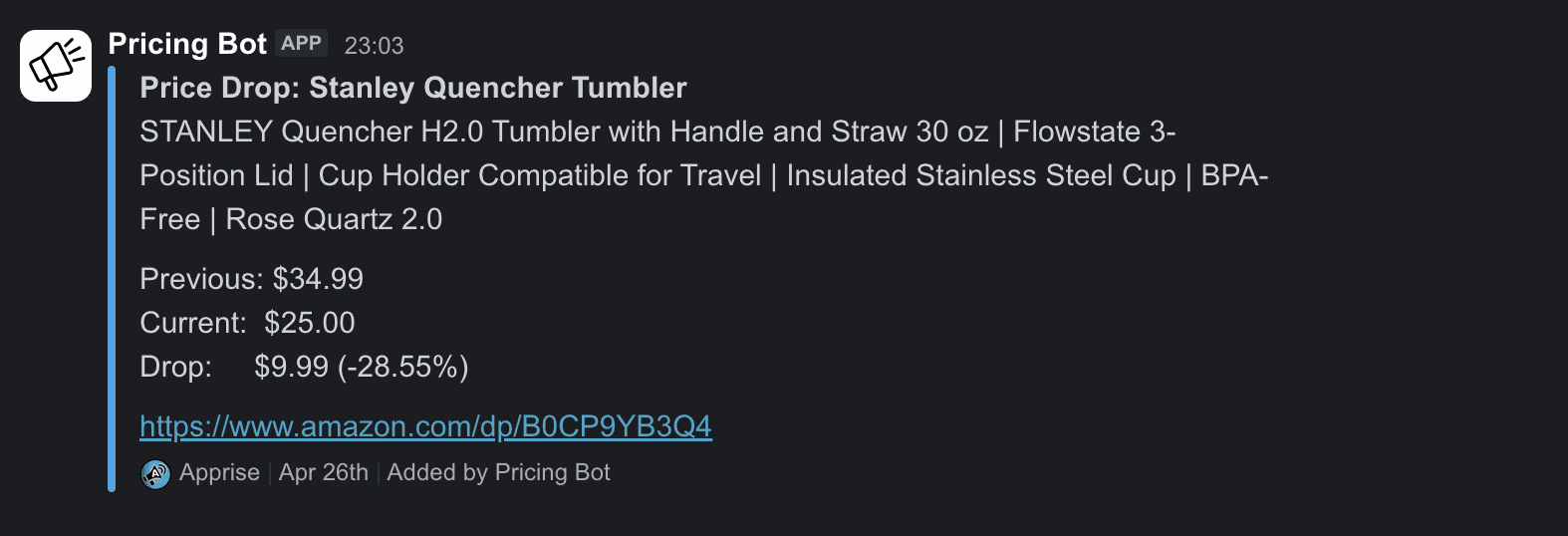
When the monitor sends an alert, it appears in the configured channel:
Verify the alert channel before relying on it
Here is how this can fail: a price drop happens, the monitor logs Alert sent, but nothing arrives in Slack because the URL was malformed. The problem is only discovered days later. This is a common silent-failure pattern: logs that report "success" while data is dropped without alarms. A 60-second verification step prevents this:
python -c "from alerts import notifier; notifier.notify(title='Amazon monitor – wiring test', body='If you see this, alerts are wired up correctly.')"
python -c "from alerts import notifier; notifier.notify(title='Amazon monitor – wiring test', body='If you see this, alerts are wired up correctly.')"
python -c "from alerts import notifier; notifier.notify(title='Amazon monitor – wiring test', body='If you see this, alerts are wired up correctly.')"
If the test message appears in your channel, the configuration is correct. If not, run apprise -vv -t 'test' -b'body' 'your-url-here'; the verbose flag identifies which part of the URL the library is rejecting.
Step 7 – Run the monitor
python monitor.py
python monitor.py
python monitor.py
Expected output on the first cycle (no targets reached yet):
2026-04-2510:45:01 | INFO | Monitoring 4products2026-04-2510:45:01 | INFO | Check interval:every 30minutes2026-04-2510:45:01 | INFO | Starting price check cycle...
2026-04-2510:45:08 | INFO | Bounty Paper Towels – $24.42(low: $24.42,high: $24.42)2026-04-2510:45:14 | INFO | Amazon Basics AA Batteries – $9.99(low: $9.99,high: $9.99)2026-04-2510:45:21 | INFO | Stanley Quencher Tumbler – $34.99(low: $34.99,high: $34.99)2026-04-2510:45:28 | INFO | Owala FreeSip Water Bottle – $29.99(low: $29.99,high: $29.99)
2026-04-2510:45:01 | INFO | Monitoring 4products2026-04-2510:45:01 | INFO | Check interval:every 30minutes2026-04-2510:45:01 | INFO | Starting price check cycle...
2026-04-2510:45:08 | INFO | Bounty Paper Towels – $24.42(low: $24.42,high: $24.42)2026-04-2510:45:14 | INFO | Amazon Basics AA Batteries – $9.99(low: $9.99,high: $9.99)2026-04-2510:45:21 | INFO | Stanley Quencher Tumbler – $34.99(low: $34.99,high: $34.99)2026-04-2510:45:28 | INFO | Owala FreeSip Water Bottle – $29.99(low: $29.99,high: $29.99)
2026-04-2510:45:01 | INFO | Monitoring 4products2026-04-2510:45:01 | INFO | Check interval:every 30minutes2026-04-2510:45:01 | INFO | Starting price check cycle...
2026-04-2510:45:08 | INFO | Bounty Paper Towels – $24.42(low: $24.42,high: $24.42)2026-04-2510:45:14 | INFO | Amazon Basics AA Batteries – $9.99(low: $9.99,high: $9.99)2026-04-2510:45:21 | INFO | Stanley Quencher Tumbler – $34.99(low: $34.99,high: $34.99)2026-04-2510:45:28 | INFO | Owala FreeSip Water Bottle – $29.99(low: $29.99,high: $29.99)
The low and high values are the same on this first cycle because no earlier readings exist; later cycles will show the price history as it builds up.
When a price drops to or below your target, two extra log entries appear and a notification is sent to your configured channel:
2026-04-2514:15:21 | SUCCESS | TARGET HIT! Stanley Quencher Tumbler – $19.99(target: $20.00)2026-04-2514:15:21 | SUCCESS | Alert sent forB0CP9YB3Q4 – $19.99
2026-04-2514:15:21 | SUCCESS | TARGET HIT! Stanley Quencher Tumbler – $19.99(target: $20.00)2026-04-2514:15:21 | SUCCESS | Alert sent forB0CP9YB3Q4 – $19.99
2026-04-2514:15:21 | SUCCESS | TARGET HIT! Stanley Quencher Tumbler – $19.99(target: $20.00)2026-04-2514:15:21 | SUCCESS | Alert sent forB0CP9YB3Q4 – $19.99
The monitor runs an immediate first check, then every 30 minutes. Price history builds up in price_history.json; logs are written to monitor.log. Press Ctrl+C to stop.
Troubleshooting
Getting CAPTCHAs? Increase the request delay. The 3 to 7 second delay is the minimum; reducing it uses up proxy reputation faster. If CAPTCHAs appear on the first request, your proxies might be datacenter IPs labeled as residential. Diagnostic checks:
Test
Real residential
Datacenter or fake
Fraud-score API
Low score
High score
Reverse DNS
ISP hostname (Comcast, Verizon, AT&T)
Hosting provider (AWS, OVH, DigitalOcean)
Geolocation consistency
Stays in one region
Jumps between regions
Several free tools do these checks. The HypeProxies proxy checker returns fraud score, ASN, hostname, geolocation, and VPN/Tor detection in one result. IPQualityScore and Whoer are also common options.
Prices not parsing? Variant products (iPads, phones with size/color pickers) sometimes load the price through JavaScript rather than embedding it in the static HTML, which means both the JSON blob and the CSS fallback chain return None. Either skip those ASINs or use a headless browser such as Nodriver for that subset. The edge case is explained in detail in Step 4 – Build the scraper.
All proxies timing out? First, make sure the proxy account is active and not suspended for billing or usage limits. If the account is active, check https://www.amazon.com/robots.txt directly through one proxy with curl_cffi. If that times out, the proxy provider has a routing issue. If the request works, your firewall is likely blocking outbound traffic on the proxy port.
Monitor stops finding new prices over time? Amazon updates the page DOM from time to time. If both the JSON parser and the CSS fallback chain return None, look at a fresh page in DevTools. Either the JSON wrapper class has been renamed (update PRICE_JSON_SELECTOR) or the CSS classes have changed (add a new entry to PRICE_SELECTORS).
Still stuck after working through these checks? Post the question on r/webscraping for general scraping and anti-bot help, or check the curl_cffi issue tracker for TLS-fingerprinting bugs. If you are using HypeProxies and the issue looks proxy-related, the HypeProxies Discord is the fastest channel. Share what you are seeing and a snippet of your scraper output.
Deploy continuously
The monitor needs to run continuously; a personal machine is not best for this. For most users, a $5 per month VPS (Hetzner, DigitalOcean, or Linode) with systemd is the simplest setup: around 10 minutes of configuration, and the service survives reboots. Free alternatives exist (Oracle Cloud's Always Free ARM instance, or restructuring as a GitHub Actions cron job), but they require more setup time.
systemd unit file
Copy the project to /opt/amazon-monitor on the VPS and create a Python virtual environment at /opt/amazon-monitor/.venv. Then create /etc/systemd/system/amazon-monitor.service:
sudo systemctl daemon-reloadsudo systemctl enable --now amazon-monitorsudo journalctl -u amazon-monitor -f #follow the live log
sudo systemctl daemon-reloadsudo systemctl enable --now amazon-monitorsudo journalctl -u amazon-monitor -f #follow the live log
sudo systemctl daemon-reloadsudo systemctl enable --now amazon-monitorsudo journalctl -u amazon-monitor -f #follow the live log
Docker
For a Docker deployment, write a minimal Dockerfile that installs the dependencies and runs python monitor.py. Mount price_history.json as a volume so the data stays across container restarts:
docker run -d --name amazon-monitor \\
  -v $(pwd)/price_history.json:/app/price_history.json \\
  amazon-monitor:latest
docker run -d --name amazon-monitor \\
  -v $(pwd)/price_history.json:/app/price_history.json \\
  amazon-monitor:latest
docker run -d --name amazon-monitor \\
  -v $(pwd)/price_history.json:/app/price_history.json \\
  amazon-monitor:latest
GitHub Actions (source repository)
A GitHub Actions cron variant of this implementation is at github.com/triposat/amazon-price-monitor. Fork the repository and add your PROXIES and APPRISE_URLS as repository secrets. The workflow then runs on a 30-minute schedule.
A note on design differences and alert behavior. The blog uses a target-price alert model (one alert per cycle while the price stays at or below the configured target_price), while the source repository uses a drop-based model with a 6-hour cooldown (one alert per product per new 24-hour low). The blog's simpler model means a product that drops to its target will trigger a notification on every following cycle until the price recovers. If you do not want repeated alerts on your channel, either add cooldown logic to monitor.py or use the source repository implementation. Choose the model that matches the use case.
Scaling and adapting
You have a working monitor. The sequential ceiling is set by per-fetch latency:
Sequential cycle limits. Each product fetch takes around 10 seconds: 3 to 7 seconds of pacing delay, plus 3 to 4 seconds of network round-trip. The resulting throughput limits:
Check cadence
Maximum products (sequential)
Hourly
around 300
Every 2 hours
around 600
Every 6 hours
around 2,000
To exceed 300 products at hourly cadence, refactor the fetch loop with curl_cffi.AsyncSession and asyncio.gather().
Common next steps:
Scale up. With the async upgrade, around 50 ISP proxies running in parallel handle around 1,200 products at hourly cadence (the Pro entry-tier plan size at HypeProxies). Add IPs as the catalog grows. As cycles get closer to the interval ceiling, add a file lock (such as flock on Linux) to prevent overlapping cycles from writing to price_history.json concurrently; TinyDB is not designed for concurrent writes.
Tier your cadence.schedule.every(15).minutes.do(check_high_priority) for flash deals, schedule.every(6).hours.do(check_low_priority) for wishlist items.
Adapt to other eCommerce targets. The same stack works against most sites that serve static HTML pricing, such as Walmart, Target, Best Buy, eBay, and Costco. The site-specific changes are the item ID structure (what other sites call Amazon's ASIN) and the parser selectors. The TLS, proxy, and retry layers stay the same.
Adapt the stack for JavaScript-rendered prices. For variant pickers, coupons, or other prices that load through JavaScript, replace curl_cffi with a headless browser. The rest of the stack stays the same.
Adapt the database for larger catalogs. For 5,000 or more products at sub-hourly cadence, replace TinyDB with PostgreSQL and a queue.
Add a retention policy. Without pruning, price_history.json grows without limit. The source repository implementation prunes readings older than 30 days; add similar logic to monitor.py for long-running deployments.
If you do not have an ISP proxy pool yet, HypeProxies plans start at $65 per month for 50 IPs with unlimited bandwidth. This is enough for around 300 products sequentially at hourly cadence, or around 1,200 with the async upgrade.
Bottom line
Reliable Amazon price monitoring rests on two foundations: matching a browser's TLS fingerprint, and using IPs with consumer-ISP reputation. With those right, the codebase stays small. The work that compounds over time is in the alert thresholds: tune them so notifications stay signal, not noise.