C# Website Scraping: A Guide To Scaling Your Operations
If you're reading this, you’ve probably followed a dozen tutorials that promised to teach you C# web scraping. They all show the same thing: a simple HttpClient request, some parsing with HtmlAgilityPack, and poof—you've scraped a static blog post. That's a great lab experiment, but it fails instantly in the real world. Most guides are incomplete, teaching you tactics that get your IPs burned and your project stalled. This is your playbook for building scraping operations that actually work.

Gunnar
Last updated -
Tutorials
What is C# Website Scraping?
C# website scraping is the process of using the C# programming language to automate data extraction from websites. In practice, this means writing code that sends HTTP requests to a target site, parses the returned HTML, and extracts specific data points. It matters because it allows developers in .NET environments to build scalable, high-performance data pipelines without leaving their native ecosystem.
How C# Scraping Actually Works (The Operator's View)

The biggest issue with beginner guides is they ignore the brutal realities of modern web infrastructure. As an infrastructure operator managing billions of requests monthly, we see firsthand where scrapers fail. It’s almost never about complex C# logic. The real killers are:
JavaScript-Heavy Applications: Most modern sites use frameworks like React or Vue. Content is rendered client-side, meaning your
HttpClientgets back a useless, empty HTML shell. You need a real browser engine to see what a user sees.IP-Based Blocking & Reputation: Your server’s IP address is your identity. Aggressive rate limiting and reputation scoring systems will flag and ban it before you get any meaningful data. A single IP is a single point of failure.
Sophisticated Fingerprinting: Anti-bot services analyze everything from your TLS handshake and HTTP headers to browser-specific signals to identify and block automated clients. A default
HttpClientfingerprint screams "bot."
This guide breaks down the strategies you need to build a resilient C# scraping pipeline—one that anticipates these defenses and knows how to beat them.
The C# Ecosystem For Data Extraction
While Python has a reputation for scraping, C# is a powerhouse in enterprise .NET environments where seamless integration is non-negotiable. The go-to tool has long been HtmlAgilityPack, which is excellent for tearing through static HTML.
But production-grade scraping requires more. It's about handling dynamic content with headless browsers like Playwright, integrating high-performance rotating proxies, and writing smart logic to manage rate limits and concurrency. If you want to dive deeper into the high-level strategy, check out our operator's guide to unlocking data at scale.
Handling Static vs. Dynamic Websites In C#
This is the first critical decision: do you use a simple HTTP client or fire up a full headless browser? Picking the wrong tool is a classic rookie mistake that wastes dev time, burns through resources, and often ends in total failure. The difference is where the content is built. Static sites give you a complete HTML document from the server. Dynamic sites send a bare-bones HTML shell and use client-side JavaScript to construct the page in the browser.
The Static Site Scenario: HttpClient + HtmlAgilityPack
When it works: For static content—forums, online directories, simple blogs—your priorities are speed and efficiency. A full browser is overkill. HttpClient paired with HtmlAgilityPack (HAP) is the surgical instrument for this job. HttpClient sends a direct GET request, which is lightweight and fast. HAP then parses the raw HTML, handling even messy code with powerful XPath selectors. This is the most resource-efficient approach for high-volume, low-complexity targets.
When it fails: This stack is completely blind to client-side JavaScript. If the target is a Single-Page Application (SPA) or loads data asynchronously, HttpClient will retrieve an empty or incomplete HTML document, rendering your scraper useless.
The Dynamic Site Scenario: Playwright
When it works: For a modern e-commerce product page or any SPA, the initial HTML is often just a loading spinner. The valuable data is loaded with JavaScript. A headless browser automation tool like Playwright is non-negotiable here. It launches a real browser (like Chromium) that your C# code controls, executing JavaScript just like a user's browser would. This gives you access to the fully rendered, data-rich page. Our guide on Playwright proxy integration is a great resource for managing your network identity in these complex scenarios.
Playwright's architecture intelligently waits for elements to be actionable, drastically cutting down on the flaky, timing-based errors that plague older tools like Selenium. See our analysis on Selenium proxy integration challenges.
When it fails: It's slower and more resource-intensive. Using Playwright for a simple static site is like using a sledgehammer to crack a nut—it works, but it's inefficient and burns unnecessary CPU and memory, increasing infrastructure costs at scale.
Scraping Scenario | Recommended Tool | Cost vs. Success Tradeoff |
|---|---|---|
Simple blog posts, forums | HttpClient + HtmlAgilityPack | Low cost, high speed. Fails against any JavaScript rendering. |
E-commerce sites, SPAs | Playwright | Higher cost (CPU/memory), but necessary for success against dynamic sites. |
Extracting data from an internal API | HttpClient | Lowest cost, fastest method if you can reliably access a stable API endpoint. |
Interacting with a page (clicks, scrolls) | Playwright | High cost, but the only way to simulate user actions required to reveal data. |
Integrating Proxies to Avoid IP Blocks
Making repeated requests from the same IP is the fastest way to get your server permanently blocked. At scale, your server's IP isn't just an address; it's a reputation. Once burned, your operation halts. For any serious C# scraping project, using proxies is non-negotiable. It’s how you distribute your digital footprint and get around the rate limits that guard valuable data.
Proxy Types & Tradeoffs
The real challenge isn't the code; it's picking the right proxy type. Using the wrong tool wastes money and guarantees failure. While this ultimate guide to best proxies for web scraping offers a deep dive, here’s the operational breakdown:
Datacenter Proxies:
When it works: Targets with low security, basic scraping tasks where speed is paramount.
When it fails: The moment they encounter a sophisticated anti-bot system. Their commercial ASN (Autonomous System Number) is an easy red flag. They get blocked by default on most high-value sites.
Cost vs. Success: Cheap, but the success rate is extremely low against protected targets, making the total cost of data acquisition very high.
Residential Proxies:
When it works: Scraping high-security targets like e-commerce giants, social media, or flight aggregators. The IP comes from a real consumer ISP, making it look like a genuine user.
When it fails: If not managed properly, frequent rotation on sites requiring a stable session can cause issues. They are also more expensive per GB than datacenter IPs.
Cost vs. Success: Higher initial cost, but the success rate is orders of magnitude higher. This is the professional standard for reliable web scraping proxies.
ISP (Static Residential) Proxies:
When it works: Tasks needing a stable, high-reputation identity for an extended session, like managing social media accounts or checking out items from a shopping cart.
When it fails: Can be overkill for simple, per-request rotation tasks where residential proxies are more cost-effective.
Cost vs. Success: The premium choice. Offers the speed of a datacenter with the trust of a residential ASN. High cost, but unmatched reliability for session-intensive tasks.
Why You’re Still Getting Blocked
So you’ve integrated a solid proxy service, but you're still getting CAPTCHAs and 403s. Welcome to the real cat-and-mouse game. The issue is no longer just your IP; it’s everything else about how your scraper presents itself. Modern anti-bot systems have evolved beyond IP reputation checks. If you're just rotating IPs, you're fighting yesterday's war.
Browser, TLS, and Header Fingerprinting
From the moment your scraper connects, it’s giving away clues. The initial TLS handshake is analyzed via JA3 fingerprinting to create a signature of your client. A default HttpClient fingerprint screams ".NET application," an easy block. Headless browsers leak hundreds of other tells: navigator.webdriver, canvas rendering quirks, font lists, and browser plugin profiles. If these fingerprints don't match a typical user, you're flagged.
Your HTTP headers must also tell a consistent story. Sending a User-Agent for Chrome on Windows while your TLS fingerprint is typical of a Linux server is a rookie move that gets you blocked instantly.
Bad Rotation Logic & ASN Reputation
Logic is just as critical. Many sites now use SMS verification as a gatekeeper, requiring a virtual phone number SMS verification strategy to pass. Firing off requests for a page's assets (HTML, CSS, images) from different IPs is unnatural. You must maintain the same IP for a whole session on complex targets. This is why knowing when sticky vs. rotating proxies actually matter is so important.
Finally, you can get blocked based on your Autonomous System Number (ASN)—the network your IP belongs to. If your proxy provider sources IPs from shady or blacklisted ASNs, your requests are treated with suspicion, regardless of the individual IP's cleanliness.
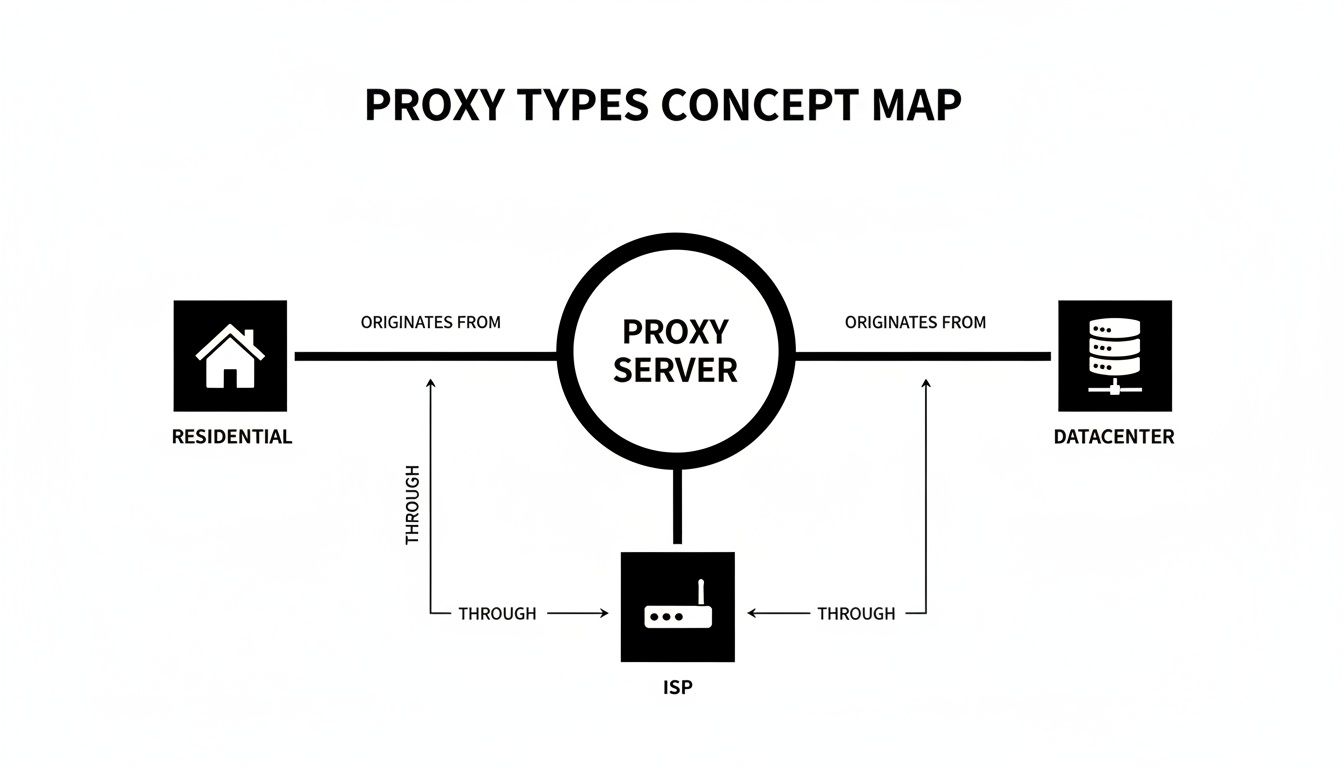
The takeaway is that residential and ISP proxies originate from consumer networks, giving them a much higher trust score than IPs from a data center ASN.
Real-World C# Scraping Use Cases
E-commerce Price Monitoring:
Why proxies are required: E-commerce sites aggressively block IPs that make rapid, repetitive requests to product pages.
What actually works: High-quality residential proxies rotated per request to avoid pattern detection. You need a large, clean pool to monitor thousands of SKUs.
What fails at scale: Datacenter proxies are blocked almost immediately. Using a single residential IP will get rate-limited.
What teams underestimate: The complexity of handling product variations (size, color) and dynamic pricing rules that change based on user location or history.
SEO Data Aggregation:
Why proxies are required: Search engines like Google have the most sophisticated anti-bot systems on the planet. Scraping SERPs without a massive proxy pool is impossible.
What actually works: A mix of ISP and residential proxies with precise geo-targeting to check rankings from specific locations.
What fails at scale: Any small or low-quality proxy pool will be quickly detected and fed polluted or CAPTCHA-filled results.
What teams underestimate: The cost. SERP scraping is one of the most demanding and expensive scraping operations due to the target's defenses.
FAQ on C# Website Scraping
Is C# web scraping legal?
Scraping publicly available data is generally legal, a point reinforced by cases like hiQ Labs v. LinkedIn. However, "legal" isn't a blank check. The trouble starts when you scrape copyrighted material, personal data protected by laws like GDPR, or anything behind a login. A site's robots.txt is a guideline, not law, but violating terms of service or causing a Denial of Service (DoS) attack can have serious legal consequences.
Is a proxy the same as a VPN for scraping?
Absolutely not. A VPN is for personal privacy, funneling all your traffic through a single, stable IP. This is the opposite of what you want for scraping. Proxies, especially rotating residential ones, are infrastructure built for automation, providing a massive pool of IPs to make each request look like a different user. Using a VPN is a surefire way to get that one IP banned.
Why shouldn't I use free proxies?
Using free proxies is an operational and security nightmare. You have no idea who runs them, if they're logging your data, or injecting malware. They are slow, unreliable, and already on every major blacklist. You will waste more time fighting with failed connections than you would have spent on a subscription to a reliable provider.
When are rotating proxies the wrong tool?
Rotating proxies are the wrong tool when you need a stable session. For multi-step processes like completing a purchase, filling out a form, or managing an account, switching IPs mid-session will get you logged out or blocked. For these scenarios, you need a sticky session from a high-quality residential or ISP proxy.
Ready to build a C# scraping operation that doesn't get blocked? HypeProxies provides the high-performance residential and ISP proxy networks engineered for exactly this challenge. Stop fighting with unreliable IPs and start getting the data you need. Explore our proxy solutions and Request a free Trial.
Share on

No credit card required. Request your free trial today.
Stay in the loop
Subscribe to our newsletter for the latest updates, product news, and more.
No spam. Unsubscribe at anytime.