How to Use Residential Proxies Without Wasting Your Budget
Most guides on how to use residential proxies are written by marketers, not engineers. They promise effortless success but omit the technical realities that cause your jobs to fail, your budget to evaporate, and your IPs to get banned. They never mention TLS fingerprinting, bad rotation logic, or ASN reputation because, frankly, they don't deal with it. This guide is different. As proxy infrastructure operators, we live in the trenches of IP bans, session failures, and CAPTCHA walls. We’re skipping the analogies and showing you how residential proxies actually work at scale, why they fail, and how to deploy them correctly.

Gunnar
Last updated -
Tutorials
A Concise Definition (That Actually Matters)
A residential proxy routes your traffic through an IP address assigned by a real Internet Service Provider (ISP) to a homeowner's device. This makes your request appear to originate from a legitimate user, not a server in a data center.
That's it. The magic isn't the IP itself, but how it's managed, rotated, and presented to the target server. The rest is operational detail—and the details are what determine your success rate.
How It Actually Works (Operator-Level)
The core challenge isn't acquiring IPs; it's managing a chaotic, dynamic pool of them without compromising performance. Your success depends entirely on the provider's ability to handle rotation, session integrity, and IP pool hygiene under load.
Rotation Methods & Session Management
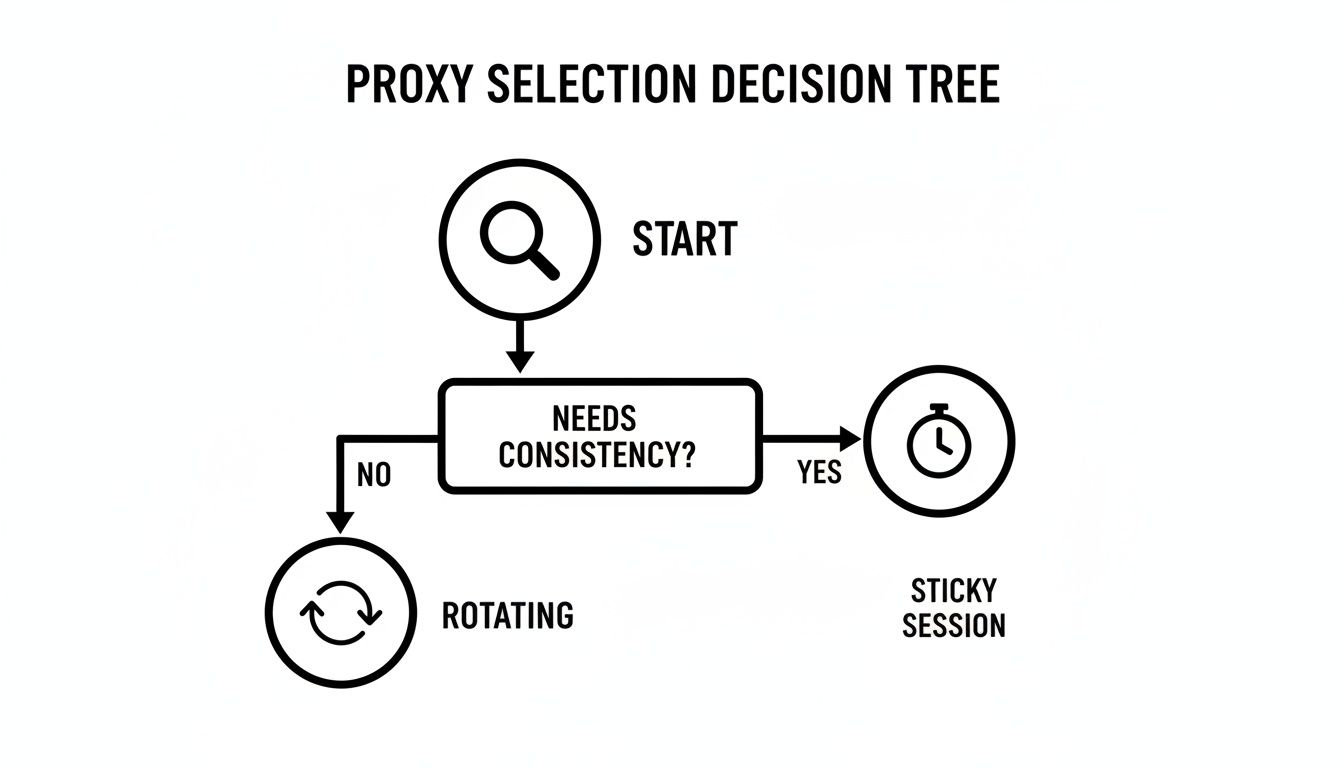
This is your primary control point and where most projects fail. You have two fundamental choices, each with critical tradeoffs.
Per-Request Rotation
This assigns a new residential IP for every single connection. It's a brute-force approach for mass data harvesting where session history is irrelevant.
When it works: Scraping thousands of search engine results pages (SERPs) or price aggregators where each request is atomic and independent.
When it fails: Any multi-step workflow. Attempting to navigate a checkout flow, log into an account, or manage a social media profile with a new IP on each click is the fastest way to get flagged for suspicious activity.
Session-Based (Sticky) Rotation
This provides a single residential IP that persists for a set duration, typically from 1 to 30 minutes. It allows you to build a coherent user journey, which is mandatory for interacting with modern web applications. You can learn more about the specifics in our guide to sticky vs rotating proxies.
Sticky Session Pitfall: The stability of your session is tied to the end-user's device. If that IP goes offline or gets flagged mid-session, your entire workflow breaks. This is a common failure mode that cheap providers don't engineer around.
IP Pool Reuse and Concurrency Limits
Providers love to boast about "millions of IPs." This is mostly a vanity metric. What truly matters is the size of the active and clean IP pool available at the moment of your request.
Oversubscribed networks lead to two critical failure modes:
IP Pool Reuse: You are assigned an IP that was just used—and potentially burned—by another customer on the same target. A flagged IP is worthless. Competent providers enforce cooldowns to prevent this; cheap ones don't.
Concurrency Bottlenecks: Your plan allows a certain number of parallel connections, but if the provider's infrastructure can't handle the load, your requests are throttled or dropped. You'll see high error rates that have nothing to do with your code or the target site.
Types & Tradeoffs: A Decision-Driven Comparison
Choosing the right proxy type is a matter of aligning your task requirements with the proxy's inherent strengths and weaknesses.
Proxy Type | When It Works | When It Fails | Cost vs. Success Tradeoff |
|---|---|---|---|
Rotating Residential | Large-scale, anonymous data extraction (e.g., SERP scraping, price monitoring). | Multi-step processes requiring a consistent identity (e.g., account management, checkouts). | Priced per GB. Highly cost-effective for high-volume, low-complexity tasks where IP diversity is key. |
Sticky Residential | Workflows requiring session integrity (e.g., sneaker botting, ad verification, managing social accounts). | When the assigned IP gets flagged or goes offline mid-session, forcing a workflow restart. | Higher cost due to the need to reserve a specific IP. Essential for tasks that fail without session persistence. |
Static Residential (ISP) | Building long-term trust with a target. Managing high-value accounts or performing tasks that are sensitive to IP changes. | Not suitable for tasks requiring mass anonymity or rapid IP cycling. They are a finite, valuable resource. | Highest cost per IP but provides unmatched stability and a clean history, leading to near-zero block rates for sensitive operations. |
Before proceeding, it's wise to validate your existing setup. A reliable proxy checker tool can confirm if your IPs are live and routing correctly.
Why You’re Still Getting Blocked (The Mandatory Section)

If you've bought residential proxies and are still facing blocks, it’s because your IP is only one part of the puzzle. Sophisticated anti-bot systems analyze your entire connection signature, not just the address. A pristine residential IP is useless if the rest of your request profile screams "automation."
Here are the real reasons your requests are failing.
Browser Fingerprinting
This is the most common culprit. Websites profile your browser environment to create a unique signature. Mismatches are an easy giveaway. They check:
User-Agent: Does it match your TLS and HTTP header patterns?
Screen Resolution & Fonts: Headless browsers often use non-standard resolutions and font sets.
WebGL Rendering: How your GPU renders a test image creates a unique hardware-level identifier.
TLS/Client Hints
Before any HTTP request, your client performs a TLS handshake. The combination of ciphers and extensions it offers creates a JA3 fingerprint. A Python requests library fingerprint looks nothing like a real Chrome browser. If your TLS handshake screams "script" while your User-Agent claims "Chrome," you've already failed. Modern browsers also use Client Hints to send device-specific data; their absence is a red flag.
Header Entropy
Anti-bot systems don't just check for the presence of headers; they check the order. Automation tools often send headers in a fixed, alphabetical order, whereas real browsers send them in a more variable, chaotic sequence. This low "entropy" is a clear sign of a script.
ASN Reputation
Not all residential IPs are equal. The Autonomous System Number (ASN) identifies the ISP (e.g., Comcast, Verizon). If your proxy provider sources IPs from networks known for abuse or malware, that ASN will have a poor reputation. You can be blocked based on the IP's origin network before your request is even analyzed.
Bad Rotation Logic
Using a new IP for every asset on a page (HTML, CSS, images) is unnatural. Real users load an entire page from a single IP. This hyper-aggressive rotation is an obvious automation signal and a common mistake that explains why your proxies get banned.
Real-World Use Cases (With Constraints)
Forget generic lists. Here is how specific teams use residential proxies, what actually works, and what they underestimate.
E-commerce Price and Product Scraping
The goal is to extract data from millions of product pages without getting rate-limited or blocked.
What Proxy Type Actually Works: High-rotation residential proxies are the workhorse. The strategy is to make every request appear as a new user. Per-request rotation is ideal here, spreading the load across thousands of IPs to avoid volume-based detection. This is the core setup for effective web scraping proxies.
What Fails at Scale: Relying solely on IP rotation. If you rotate IPs but send the same static User-Agent and headers with every request, you're still creating an easily blockable pattern.
What Teams Underestimate: The need for header and fingerprint randomization. Successful scraping at scale requires pairing IP rotation with dynamic cycling of browser fingerprints to make each connection appear unique.
SEO Monitoring and Rank Tracking
The objective is to check search engine rankings from specific geographic locations without being fed misleading results or CAPTCHAs.
What Proxy Type Actually Works: Geo-targeted residential proxies with sticky sessions (5-10 minutes). This allows your crawler to perform multiple searches from a single IP, mimicking real user behavior. For CAPTCHA-heavy targets like Google, Static Residential (ISP) proxies are superior as they build a trusted history.
What Fails at Scale: Using per-request rotation. Firing off hundreds of searches from hundreds of different IPs in minutes is a blatant automation footprint that triggers immediate CAPTCHAs.
What Teams Underestimate: The importance of precise geo-targeting. Requesting IPs from "US" is not enough. To get accurate local SERP data, you need IPs originating from the specific city or state you are targeting.
Ad Verification
The goal is to confirm that ads are being displayed correctly in different regions and on different devices, free from fraud.
What Proxy Type Actually Works: A combination of mobile and residential sticky proxies. You need to simulate real users on both desktop and mobile devices, requiring IPs sourced from both ISP and mobile carrier networks. The session must be sticky to load the page and verify the ad placement and click-through behavior.
What Fails at Scale: Using datacenter proxies. Ad networks have been blocking datacenter IPs for years; they are completely ineffective for this task.
What Teams Underestimate: The necessity of mobile proxies. Many ad campaigns are mobile-specific. Without proxies sourced from real mobile carrier networks (e.g., T-Mobile, Verizon), you cannot accurately verify mobile ad delivery.
How to Choose the Right Setup
Decision Rules
Analyze the Target: Is it a simple HTML endpoint or a JavaScript-heavy application with sophisticated bot detection? The more complex the target, the cleaner your IP pool must be.
Define Session Requirement: Does your workflow require multiple steps under a single identity? If yes, you need sticky sessions. If no, rotating is more efficient. This is the most critical decision point, explored further in our sticky vs. rotating proxies guide.
Assess Geo-Targeting Needs: Do you need IPs from a general region or a specific city? Be precise.
Budget vs. Reliability Guidance
A common buying mistake is optimizing for the lowest cost-per-GB. A cheap plan with a 30% failure rate is far more expensive than a premium plan with a 2% failure rate once you factor in wasted engineering hours, retries, and incomplete data. Cheaper providers often run oversubscribed networks with poor IP hygiene, leading directly to higher failure rates.
When NOT to Use Rotating Proxies
Rotating proxies are the wrong tool for any task requiring a consistent identity.
Account Management: Logging into a social media or e-commerce account from a dozen different IPs in an hour is a primary trigger for fraud detection. Use a Static Residential Proxy to build a trusted history.
High-Stakes Checkouts: While rotating proxies are useful for monitoring stock, switching IPs between adding an item to a cart and submitting payment will get the transaction flagged. Use a short-duration sticky session.
FAQ Section
Are residential proxies legal?
Yes, using residential proxies for legitimate purposes like scraping public web data, ad verification, and market research is legal. Legality depends on how you use them. Scraping copyrighted or private data, violating a website's terms of service through aggressive crawling, or engaging in credential stuffing is illegal. Always respect privacy laws like GDPR and CCPA.
What is the difference between a residential proxy and a VPN?
A VPN is a personal privacy tool designed to encrypt your device's entire internet connection through a single server. A residential proxy is an infrastructure tool for data collection, offering access to a large pool of IPs with granular control over rotation and sessions for automation at scale. You cannot effectively scrape with a VPN.
Why are free residential proxies a bad idea?
There is no such thing as a free lunch in infrastructure. Free proxy networks are slow, unreliable, and use IPs that are already blacklisted. More critically, they are a massive security risk. Operators often monitor your traffic, inject malware, or steal credentials. Many are built on botnets of compromised devices.
How much do residential proxies cost?
Costs vary widely based on provider quality, traffic volume, and features. Expect to pay anywhere from $3 to $15 per gigabyte of traffic. Plans are typically sold in monthly packages (e.g., 50 GB for $150). Static Residential (ISP) proxies are often sold per IP, ranging from $2 to $5 per IP per month. Be wary of prices that seem too good to be true—they usually indicate a low-quality, oversubscribed network.
When are rotating proxies the wrong tool?
Rotating proxies are the wrong choice whenever you need to maintain a consistent identity. For managing accounts, completing checkouts, or interacting with financial sites, the constant IP switching is a massive red flag. These tasks require a Static Residential Proxy to build a trusted, stable session history. See our guide on when to use rotating proxies for more failure scenarios.
Share on

$1 one-time verification. Unlock your trial today.
Stay in the loop
Subscribe to our newsletter for the latest updates, product news, and more.
No spam. Unsubscribe at anytime.