What Is a Rotating Proxy? Types, Setup, and Use Cases
A rotating proxy is a proxy server that automatically assigns a different IP address from a pool for each connection request or at set time intervals. The proxy gateway manages this rotation, so your requests appear to come from multiple sources. Rotating proxies are standard infrastructure for web scraping, price monitoring, ad verification, and any task where a single IP address triggers rate limits or blocks.

Gunnar
Last updated -
Proxies

What is a rotating proxy?
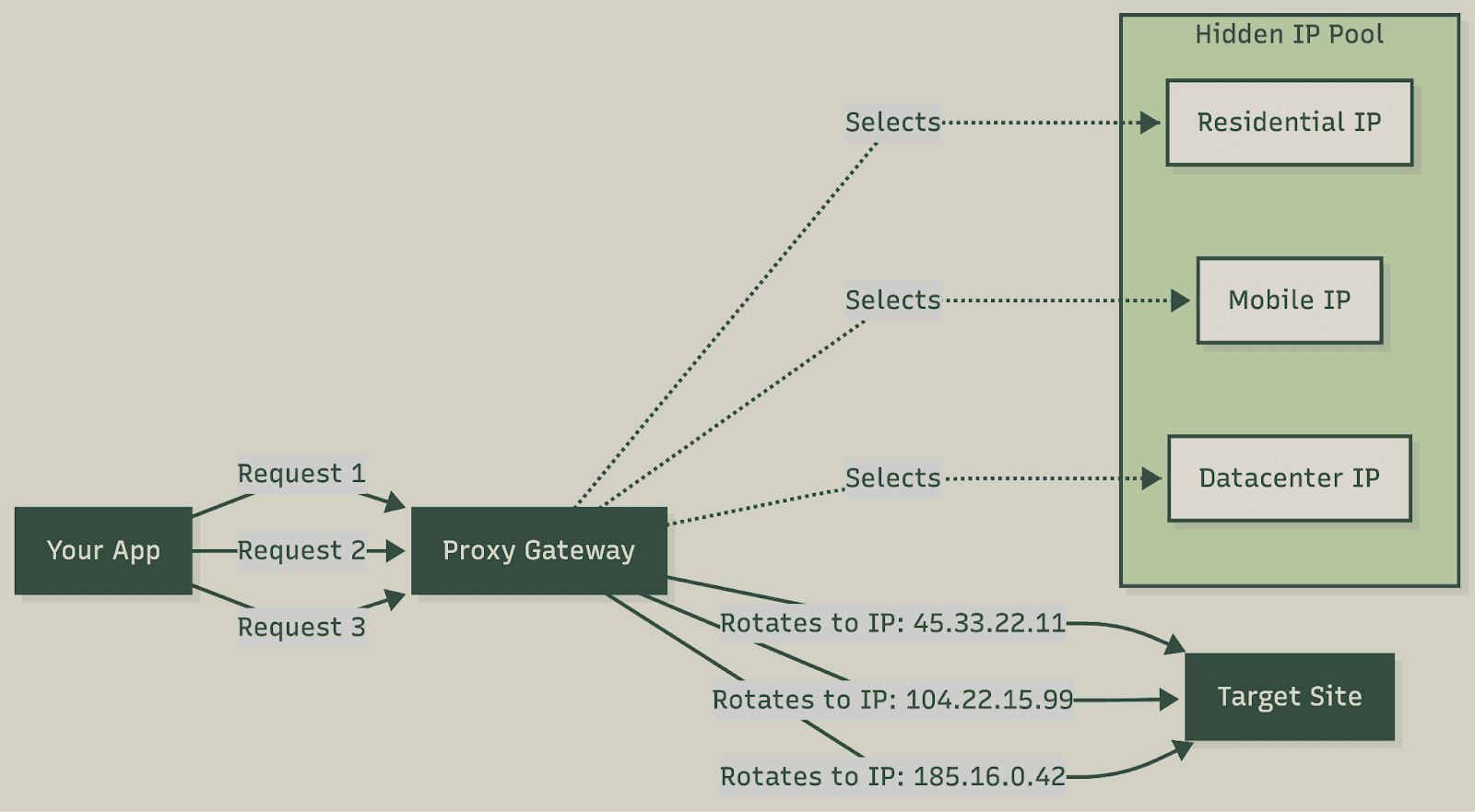
A rotating proxy sits between your application and target websites. Instead of forwarding requests through a single IP address, it pulls from a pool of thousands or millions of IPs and assigns a fresh one based on your rotation settings.
The architecture works like this: you send requests to a single gateway endpoint (often called a backconnect proxy). The gateway selects an IP from its pool, forwards your request through that IP, and returns the response. On the next request, it can assign a completely different IP or maintain a sticky session (keeping the same IP), depending on your configuration.
This differs from static proxies, where you get a fixed list of IP addresses and manage rotation yourself. With rotating proxies, the provider handles pool management, IP health monitoring, and rotation logic. You connect to one endpoint, and the complexity stays on their side.
How rotation actually works
The gateway maintains a pool of IPs from datacenters, residential ISPs, or mobile carriers. When your request arrives, the gateway’s load balancer selects an available IP based on your targeting parameters (country, city, ASN) and rotation settings.
Most providers track IP health internally. If an IP gets flagged or blocked, the system automatically replaces it. This removes the need for you to maintain blocklists or monitor individual IPs.
Rotating proxies vs static proxies
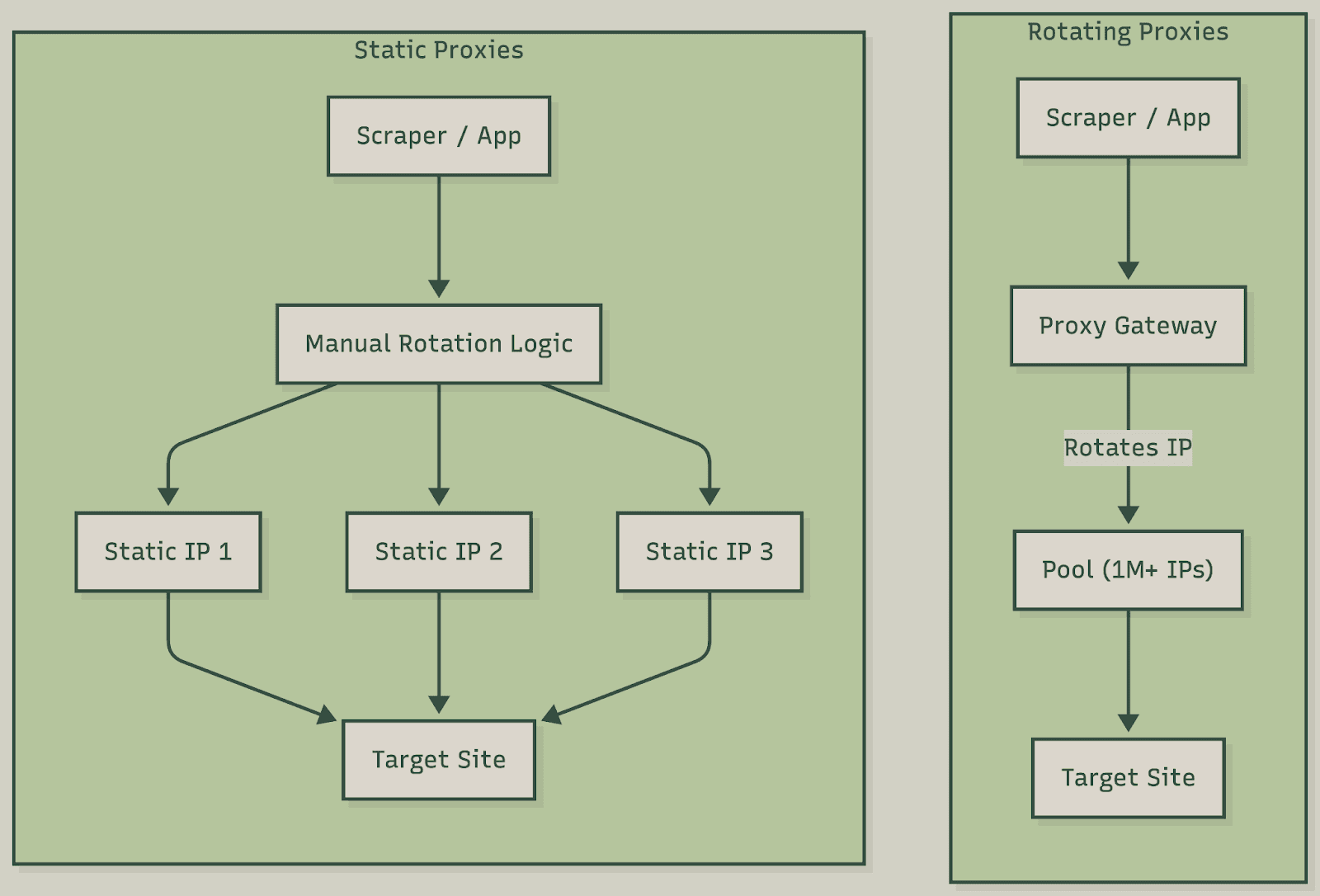
Static proxies give you dedicated IP addresses that don't change. You receive a list of IPs/credentials and implement the rotation logic yourself. This is best for a consistent identity across sessions or when target sites whitelist specific IPs. For example, ISP proxies provide static residential IPs with datacenter speed – ideal for account management.
Rotating proxies handle the complexity for you. You connect to a single endpoint, and the provider manages the pool. The trade-off is less control over specific IPs, but significantly less operational overhead.
Factor | Rotating Proxies | Static Proxies |
IP management | Provider handles pool, health, and rotation | You manage the IP list and rotation logic |
Session control | Sticky sessions available | Full control, IP stays until you change it |
Best for | High-volume scraping, distributed requests | Account management, whitelisted access |
Pricing model | Per GB bandwidth or per request | Per IP, monthly subscription |
Types of rotating proxies
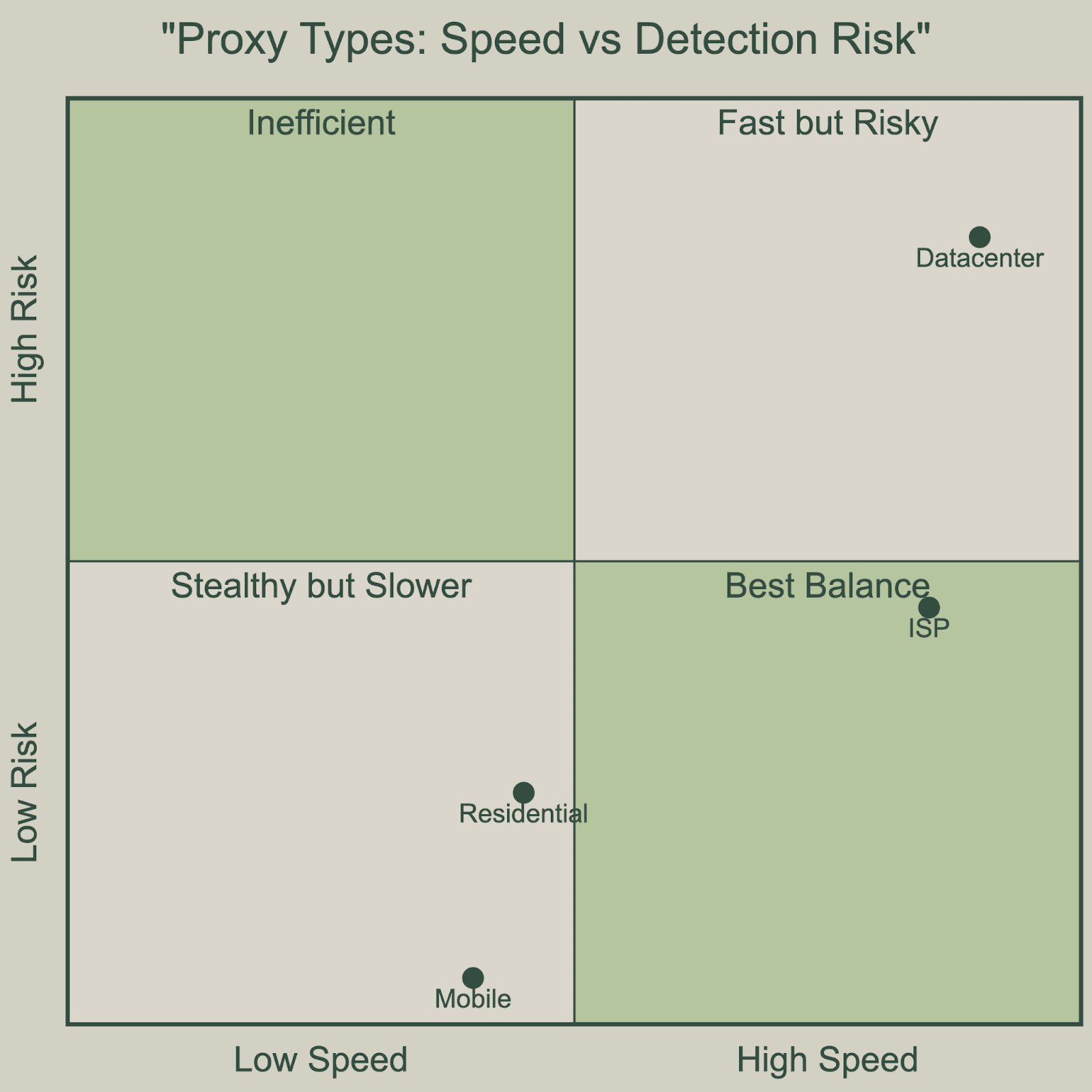
Rotating proxies come in 4 main categories, each with different performance characteristics, detection profiles, and price points. For a detailed breakdown, see our datacenter vs residential proxy comparison.
Datacenter rotating proxies
Datacenter proxies route traffic through proxy servers in commercial data centers. The IPs belong to hosting providers and cloud infrastructure companies, not residential ISPs.
Datacenter proxies are fast (< 50ms latency typical) and inexpensive ($0.30–$0.90 per GB).
Sites can identify datacenter IPs by checking ASN ownership. Most websites don’t bother, but high-security targets (major eCommerce, social platforms, search engines) often block or challenge datacenter ranges.
Best for scraping sites without aggressive anti-bot systems. Datacenter proxies work for the majority of websites and offer the best cost efficiency for high-volume work.
Residential rotating proxies
Residential proxies route traffic through IP addresses assigned by consumer ISPs to home internet connections. These IPs look identical to regular users because they are real home connections.
Residential proxies are slower than datacenter (100–500ms latency) and more expensive ($0.70–$4.00 per GB). You’re routing through consumer connections with variable bandwidth.
These IPs are difficult to detect via IP analysis alone since they have legitimate ISP ownership. Detection shifts to behavioral analysis – request patterns, fingerprinting, session consistency.
Best for sites that actively block datacenter traffic. Essential for scraping major platforms, price monitoring on competitive eCommerce sites, or any target with sophisticated bot detection.
Mobile rotating proxies
Mobile proxies route traffic through IP addresses assigned by cellular carriers (4G/5G connections). Mobile IPs have a unique property – carriers use Carrier-Grade NAT (CGNAT), meaning thousands of legitimate users share the same IP address.
Latency varies. Mobile proxies are the most expensive option ($2.50–$9.00 per GB) due to limited supply and operational complexity.
Mobile IPs are extremely difficult to block. Blocking one risks collateral damage to thousands of real users sharing that IP. Sites rarely take that risk.
Best for maximum reliability on the most protected targets, or when scraping mobile-specific content.
ISP proxies (static residential)
ISP proxies are a hybrid – residential IP addresses hosted on datacenter infrastructure. You get IPs that appear residential in ASN databases but with datacenter-level speed and reliability. Learn more in our ISP vs residential proxy comparison.
ISP proxies are fast (datacenter hosting) with moderate pricing ($1–$3 per GB).
They pass most IP-based residential checks. Advanced systems may detect the mismatch between residential ASN and datacenter hosting, but this requires sophisticated analysis.
Best for residential trust levels with datacenter reliability. Good for account management, consistent sessions, and targets that check IP reputation.
Proxy type comparison
Type | Speed | Cost per GB | Detection Risk | Best Use Case |
Datacenter | Fast (< 50ms) | $0.30–$0.90 | High on protected sites | High-volume, basic targets |
Residential | Medium (100–500ms) | $0.70–$4.00 | Low | Protected targets, eCommerce |
Mobile | Variable | $2.50–$9.00 | Very low | Highest-security targets |
ISP | Fast (< 50ms) | $1–$3 | Low–Medium | Account management, sessions |
Rotation methods explained
How and when your IP rotates matters as much as the proxy type. The wrong rotation strategy breaks sessions, triggers detection, or wastes bandwidth.
Per-request rotation
Every HTTP request gets a new IP address. This is the default behavior for most rotating proxy services.
Per-request rotation works best for scraping independent pages with no session requirements: SERP monitoring, product catalog scraping, and news aggregation. Any task where each request is self-contained.
Avoid per-request rotation for login flows, shopping carts, and paginated results that rely on server-side session state. Changing IP mid-session triggers security flags or breaks functionality.
Time-based rotation (sticky sessions)
The same IP persists for a set duration (typically 10–30 minutes). You control this via session identifiers in your proxy credentials.
Sticky sessions work best for multi-step workflows: login, add to cart, checkout. Also useful for paginated scraping where you need to maintain session cookies, or any flow that requires identity consistency.
Most providers use a session ID parameter in the username. Example: user-session-abc123. Keep the same session ID to maintain the IP; change it to get a new one.
On-demand rotation
You manually trigger IP changes via API calls or by changing session identifiers. The IP stays constant until you explicitly request a new one.
On-demand rotation works best for custom automation logic where you rotate based on response codes, CAPTCHAs, or other signals rather than time or request count.
Rotation method decision guide
Scenario | Recommended Method | Reason |
SERP scraping (Google, Bing) | Per-request | Each search is independent |
Product page scraping | Per-request | No session state needed |
Login + scrape user data | Sticky (10–30 min) | Maintain auth cookies |
Pagination (page 1, 2, 3...) | Sticky (5–10 min) | Consistent session expected |
eCommerce checkout flow | Sticky (10–30 min) | Cart tied to IP/session |
IP blocked mid-scrape | On-demand | Change IP on block detection |
Common use cases for rotating proxies
Rotating proxies solves a specific problem – distributing requests across many IP addresses to avoid rate limits and blocks. For more on specific applications, see our use cases overview.
Web scraping and data collection
The primary use case. Websites limit request rates per IP to manage server load and prevent abuse. Rotating proxies let you scale requests across thousands of IPs, staying under per-IP limits while achieving aggregate throughput.
Common scraping applications – price monitoring, product catalog extraction, data enrichment, real estate listings, job postings, and AI training data. For limited-edition drops (Pokemon, sneakers, collectibles), restock trackers like PokeRadar pair with fast proxies to catch inventory the moment it appears.
Price monitoring and competitive intelligence
eCommerce companies track competitor pricing across millions of SKUs. This requires frequent requests to the same sites. Rotating proxies prevents your monitoring infrastructure from getting blocked.
Ad verification and brand protection
Advertisers verify ad placements and detect counterfeit goods or unauthorized resellers hiding behind geo-blocks. Rotating proxies with geo-targeting lets you check content from IPs in specific countries, states, or cities.
SEO and SERP tracking
SEO tools track keyword rankings across search engines. Search engines aggressively rate-limit scraping, so checking rankings for thousands of keywords requires distributing requests across many IPs.
How to set up rotating proxies
Setup is straightforward. You get gateway credentials (host, port, username, password) and configure your HTTP client to use them. For platform-specific guides, see our integrations documentation.
cURL
The simplest way to test your rotating proxy is with cURL. This command routes a request through the proxy gateway and returns your current IP.
curl -x "http://username:password@gateway.proxy-provider.com:8080" "https://httpbin.org/ip" |
Python (requests library) – full Python guide
The requests library handles proxy authentication automatically. Each request gets a new IP by default.
import requests |
Python with sticky sessions
To maintain the same IP across multiple requests, add a session identifier to your proxy username. The session ID acts as a sticky key.
import requests |
Browser automation integrations
Browser automation tools like Selenium and Puppeteer require additional configuration to route traffic through proxies. For browser-based scraping, see our platform-specific guides: Selenium, Puppeteer, Playwright, and Scrapy.
Benefits of rotating proxies
Rotating proxies move beyond simple IP masking to provide a robust infrastructure for large-scale, reliable automation.
Avoid rate limits. Websites track request volume per IP. By spreading your traffic across thousands of IPs, you can scrape at high speed without triggering 429 "Too Many Requests" errors.
Unlimited concurrency. Handle traffic spikes from 100 to 10,000 threads instantly. The proxy pool manages the load without you needing to provision extra servers.
Zero DevOps overhead. Eliminate the need to maintain proxy lists, health-check IPs, or write complex rotation logic. You connect to a single endpoint, and the provider handles the infrastructure.
Unbiased data collection. Access content exactly as a local user sees it – accurate price monitoring, ad verification, and AI training data without location bias.
Session flexibility. Toggle between sticky sessions (to keep a cart active) and per-request rotation (to scrape product lists) just by changing a username parameter.
Automatic failover. If an IP gets blocked mid-request, the gateway instantly retries with a fresh one. Your scraper never sees the error – it just gets the data.
Limitations and trade-offs
Rotating proxies solves IP bans, but they come with trade-offs. You need to weigh the anonymity against higher costs, variable speeds, and smarter detection.
Behavioral detection. A clean IP won't save you if your behavior looks suspicious. Anti-bot systems now use TLS fingerprinting (JA3) to flag non-browser traffic patterns.
Cost per GB. Unlike static proxies with flat fees, residential networks run on a pay-per-GB model. Downloading heavy assets (like video) can drain your budget quickly.
Unstable latency. Since traffic routes through the real home Wi-Fi, connection speeds vary. Expect latency spikes of 200ms to 2s, which makes this poor for real-time tasks.
Pool quality. A pool of "10 million IPs" isn't useful if half of them are burned. Budget providers often resell blacklisted IPs, so premium ethically-sourced pools are worth the extra cost.
Why you're still getting blocked (and how to fix it)
IP rotation is the foundation of scraping, but it isn't a catch-all solution. If you're still hitting CAPTCHAs, you've got a fingerprint problem that goes beyond your IP address.
JA4H TLS Fingerprinting. Modern anti-bot systems like Cloudflare use JA4H to identify the specific library making a request. Standard Python
requestshas a network signature that screams bot. You can beat this with curl_cffi or tls-client – these libraries impersonate a real Chrome handshake at the network level, making your traffic look like a genuine browser.Client Hints (Sec-CH-UA). Most scrapers fail because they update the
User-Agentbut forget the Client Hints. If your header says "Chrome/131" but theSec-CH-UAhint is missing or says "Linux" while the UA says "Windows", you'll get flagged for inconsistency. Make sure yourSec-CH-UAstack matches your User-Agent strings.Request patterns and jitter. Making requests at a perfect, steady rhythm is a red flag for detection systems. Even with 1,000 IPs, a steady heartbeat pattern is easy to spot. Add jitter – randomized delays between 1–5 seconds – to break the predictable timing and make your automation feel more human.
Automation signatures. Tools like Selenium and Playwright leave traces in the browser's JavaScript environment (like the
navigator.webdriverflag). For high-security sites, use CDP-free tools like Nodriver or Camoufox, which strip away these automation markers.IP pool quality. Not all "residential" IPs are high-quality; some are just recycled datacenter ranges. If you get blocked on the very first request, the IP itself is likely burned. Use our free proxy checker to audit your provider's pool for burned IPs, detection flags, and fraud scores before you start a large job.
How to choose a rotating proxy provider
Don't judge a provider solely by IP count. Your success depends on pool hygiene (fraud scores) and protocol flexibility. To avoid mid-project failures, evaluate these 5 factors.
Pool health and sourcing. Size is a vanity metric. A massive pool of burned IPs is a liability. Prioritize providers that offer ethically-sourced residential IPs. These have higher trust scores on high-security targets like Google or Amazon because they come from real users rather than questionable botnets.
Granular geo-targeting. While country-level targeting is standard, anti-bot bypass often requires city, state, or even ZIP-code level precision – essential for local SEO monitoring or verifying ad prices that change by neighborhood. Make sure the provider offers this granularity without hidden “premium” markups.
Rotation and session control. Confirm the provider supports both per-request rotation and long-duration sticky sessions (up to 60 minutes). You also need a provider that supports SOCKS5 and UDP protocols if you plan to move beyond basic web scraping into mobile app automation or real-time data streaming.
Success rate transparency. Uptime (e.g., 99.9%) is often a misleading metric. What actually matters is the Infrastructure Success Rate (ISR) – the percentage of requests that reach the target without a proxy-side error. Always ask for a trial period to test the ISR against your specific target domains.
Pricing that scales. Avoid "use-it-or-lose-it" monthly plans for projects with unpredictable traffic. Look for pay-as-you-go (PAYG) models or bandwidth that rolls over. Always check whether you're billed based on data volume (GB) or concurrent threads, as high-bandwidth tasks like image scraping can drain a budget rapidly under the wrong model.
When to use static proxies instead
Rotation is great for volume, but it's a liability for tasks that require a long-term sticky identity. In these cases, static IPs (specifically ISP proxies) are mandatory.
Multi-accounting. Platforms like TikTok, Instagram, and Amazon track login consistency. Using a static ISP proxy with an antidetect browser ensures your identity never changes, preventing location-jump flags.
Secure whitelisting. If you're accessing a private API or a corporate CRM that only allows traffic from pre-approved IPs, rotation will lock you out instantly. Static proxies provide the fixed identity required for these systems.
Predictable costs. Static proxies typically charge per-IP monthly (typically $1.20–$2.50/IP, depending on dedicated vs shared) with unlimited bandwidth. If you're running high-bandwidth tasks, static proxies are significantly cheaper than the pay-per-GB model.
High-speed drops. For sneaker releases (SNKRS, Shopify) or ticket queues, speed is the only metric that matters. Static ISP proxies from carriers like AT&T or Verizon offer sub-50ms latency. This is essential for beating waiting room queues in first-come, first-served releases. You can see how this works in practice in our recent Labubu and Pokémon drop case studies.
Rotating proxies vs VPNs
Both tools hide your IP, but they operate at different levels of your system. For automation and scraping, choosing the wrong one leads to instant blocks.
VPNs (Network Layer) – a VPN creates an OS-wide encrypted tunnel. While it secures your entire device, it's difficult to rotate IPs programmatically, and many VPN ranges are pre-flagged by anti-bot systems.
Rotating proxies (Application Layer) – proxies are configured inside specific scripts or browsers. Because there's no encryption overhead, they're faster and allow you to cycle through millions of IPs for high-volume tasks.
Use a VPN for general privacy, secure connections on public WiFi, and accessing geo-restricted content for personal use.
Use rotating proxies for web scraping, automated data collection, or any task requiring many IP addresses.
Are rotating proxies legal?
Proxies are legal tools, but your liability depends on 2 things: what data you scrape and how your provider sources their IP pool.
Legal uses – scraping publicly accessible data (facts/prices), AI model training on public sets, ad verification, and localized SEO research.
High-risk areas – scraping Personally Identifiable Information (PII) without consent (GDPR/CCPA), bypassing paywalls or logged-in areas, and causing server distress (DoS).
Conclusion
Rotating proxies are the essential infrastructure for scalable automation. They let you bypass rate limits and anti-bot barriers by automatically cycling your requests across a massive IP pool. To maximize success rates, match the proxy type to the target's security – datacenter for raw speed, residential for high-security scraping, and mobile for the highest possible trust scores.
For tasks requiring a sticky identity – such as account management, sneaker drops, or private API access – static ISP proxies are the industry standard.
Need proxies? HypeProxies offers elite ISP proxies from major US carriers like AT&T and Verizon. Get unlimited bandwidth and sub-50ms latency starting at just $1.06/IP.
Frequently asked questions
What is the difference between rotating and static proxies?
Static proxies give you fixed IP addresses that you manage yourself. Rotating proxies automatically assign different IPs from a pool on each request or at intervals.
Should I use sticky or rotating sessions?
Use rotating (per-request) for independent tasks like SERP scraping. Use sticky sessions for workflows requiring session state: login flows, paginated browsing, shopping carts.
Are free rotating proxies safe?
No. Free proxies are often honeypots used to harvest your data, and most are blacklisted by tier-1 anti-bot systems.
What is a backconnect proxy?
Backconnect proxy is another term for a rotating proxy. You connect to a single gateway, and it routes your request through one of many backend IPs.
What is the fastest type of rotating proxy?
Datacenter proxies are the fastest. Premium ISP proxies have closed the gap, offering identical latency with much higher trust scores.
Why do I still get CAPTCHAs with rotating proxies?
Modern detection tracks behavioral signals, JA4H fingerprints, and location-jumps. Rotating IPs alone won't stop a CAPTCHA if your browser headers are inconsistent.
Can I use rotating proxies with Selenium or Playwright?
Yes. Configure the browser's proxy settings to point to your rotating proxy gateway. See our Selenium guide and Playwright guide.
How much do rotating proxies cost?
Most providers have shifted to pay-as-you-go (PAYG) pricing. Typical market rates include:
Datacenter – $0.30–$0.90 per GB (the cheapest option for speed)
Residential – $0.70–$4.00 per GB (standard for high-volume scraping)
Mobile – $2.50–$9.00 per GB (highest trust, best for app automation)
Static ISP – $1.20–$2.50 per IP (monthly billing with unlimited bandwidth)
What are ISP proxies and how are they different?
ISP proxies are residential IPs hosted on datacenter infrastructure – they combine residential trust with datacenter speed. Unlike rotating residential proxies, ISP proxies are typically static. Learn more in our ISP proxy guide.
Share on

$1 one-time verification. Unlock your trial today.
Stay in the loop
Subscribe to our newsletter for the latest updates, product news, and more.
No spam. Unsubscribe at anytime.