IP Rotation: What It Is, How It Works & Best Practices
Get a clear guide to IP rotation, from proxy gateways to session settings. Learn how to spread requests without disrupting tasks that need a consistent address.

Gunnar
Last updated -
Tutorials

Imagine handing out flyers at a busy store entrance. If you stay in the same spot wearing the same jacket all day, security is bound to notice you eventually and escort you away. Sending thousands of automated web requests from one IP address plays out the same way.
Your target websites spot the obvious web scraping and throw up CAPTCHAs or other blocks to shut you down. IP rotation distributes requests across multiple addresses rather than relying on a single IP. This can help reduce the impact of IP-specific rate limits and improve flexibility for automated workflows.
However, changing IP addresses alone doesn’t guarantee uninterrupted access. Websites can still identify automated traffic through request patterns, browser fingerprints, and other security signals.
So instead of hammering a website from one fixed location, your traffic bounces across a shifting pool of distinct identities. You go from a glaring red flag to background noise.
This article briefly walks you through how IP rotation works, how proxy gateways manage routing behind the scenes, and a few best practices to keep your data flowing smoothly.
What Is IP Rotation?
IP rotation is the process of changing the public IP address a website sees between requests or after a set period. Put differently, it lets you cycle your traffic through a pool of different IP addresses rather than rely on one.
By spreading those requests out, your activity looks like organic traffic coming from multiple, independent users. If, for instance, you’re monitoring prices across 500 product pages, your tool might check the first few pages using one IP, then seamlessly switch to another for the next batch.
However, a massive rotating pool doesn’t automatically mean a flawless operation. You still need to carefully consider the target website’s limits. Some sites allow more requests from one IP than others, so it helps to balance moderate rotation with session stability when possible.

Source: Reddit
You can also select addresses in a particular country to check regional listings, provided your proxy service supports that location.
Keep in mind that changing your IP doesn’t mask your browser cookies or local storage. To truly stay under the radar, your script still needs proper headers and clean digital habits.
Also, keep in mind that even large proxy pools aren’t infinite. Rotating proxy services select addresses from an available pool according to the provider’s routing and session rules. Although per-request rotation can change the IP used for each request, it doesn’t necessarily guarantee a unique address every time. Previously used addresses may be assigned again.
How IP Rotation Works Behind the Scenes
When you use a rotating proxy service, you don’t have to swap settings manually every time you want a new identity. Instead, a smart central gateway (also called a backconnect endpoint) handles the heavy lifting for you through a simple three-step process.
Here’s how it unfolds:
The Request: Your application or web scraping tool sends a single connection to the proxy gateway.
The Selection: The gateway instantly grabs a fresh IP address from its massive backend pool based on your target location and settings.
The Route: Your destination website sees only the proxy server IP address, processes the request, and sends the data right back to your tool.
Behind that smooth journey, most providers give you full control over how often your digital mask changes. You can typically choose between the following modes:
Per-Request Rotation: You get a brand-new identity for every single click or action. It’s perfect for high-volume data gathering where you need maximum anonymity fast.
Timed Rotation: Your IP address cycles automatically on a set schedule (like every 5 minutes). This helps balance speed with short-term stability.
Sticky Sessions: With a sticky proxy, your connection holds onto one IP address for a specific window. This is your go-to when you need to stay logged into an account or finish a multi-step form without getting kicked out.
Because the provider manages the heavy lifting behind the scenes, you never have to manually configure individual addresses. That said, make sure to keep an eye on your session rules. A residential device going offline may trigger an early IP change or an error, even before your sticky session expires.
4 Practical Ways to Rotate Your IP Address
The best way to switch your IP address depends entirely on your goal. Do you need a constant, automatic shuffle for a big data project, or just a fresh digital identity now and then? Here are four ways to get it done.
1. Let a Rotating Proxy Service Do the Heavy Lifting
If you’re sending thousands of web requests, a rotating proxy provider is your best bet. You simply choose your target location in the provider’s dashboard, copy the access link into your software, and let their servers handle the rest.
The beauty here is simplicity. Your software connects to one single point, while the provider constantly swaps out the backend IP addresses for you. Just make sure your tool supports the provider’s rotation options before you buy. A proxy connection alone doesn’t tell you when addresses will switch.
2. Manage a Private Proxy List Yourself
Instead of letting a provider shuffle the deck, you can buy a fixed list of IP addresses and let your own software manage the rotation. This gives you total control over exactly when and how you switch.
This route is perfect if you own a premium set of steady, reliable addresses. Each IP on your list stays the same, but your tool actively jumps from one to the next. That said, confirm that your software supports automatic switching; otherwise, you may have to do so manually.
3. Lean on a VPN with Built-In IP Rotation
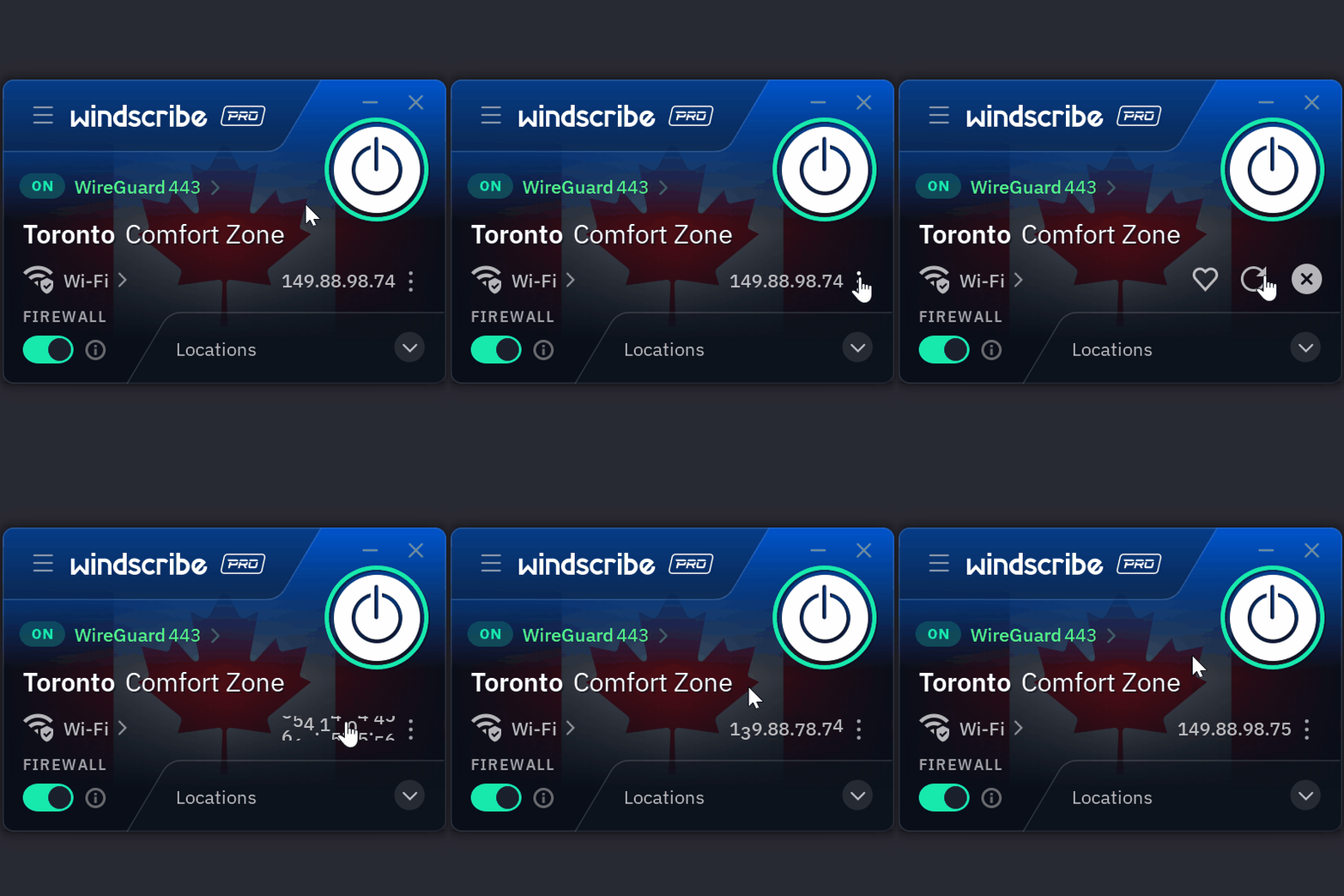
Many modern VPNs now offer built-in IP rotation features alongside their standard privacy features. Some VPN providers allow users to change their public IP addresses without fully disconnecting. For example, Windscribe offers an IP rotation feature that lets eligible paid users manually request a new address while maintaining the same VPN location.
Unlike rotating proxy services, VPNs generally provide less granular control over which IP address handles each individual web request. This makes them more practical for occasional IP changes than for large-scale scraping operations.
Here’s how Windscribe applies this feature in its software, for example:
Source: Windscribe
While this is incredibly convenient for secure browsing, it gives you less precise control over individual web requests than a dedicated proxy. As a result, IP rotation via a VPN is ideal for general browsing or privacy tasks rather than precise, high-volume data collection.
What’s more, changing your public IP address through a VPN doesn’t automatically mean jumping across the globe. Many services rotate servers within the same regional hub to keep your connection speeds stable while shifting your endpoint.
4. Force a Manual Reset via Your ISP
You can sometimes trigger an IP change directly through your Internet Service Provider (ISP). If your internet provider assigns dynamic IP addresses, restarting your modem or router may result in a different public IP. However, some providers reassign the same address even after extended disconnections. Whether this method works depends on your ISP’s network configuration and IP allocation policies.
This cost-free method may be ideal for basic troubleshooting or a privacy refresh. However, because it cuts your internet connection for a while, it’s strictly for occasional manual resets.
IP Rotation Best Practices
Judge your rotation setup by how reliably it completes the job, not how often the address changes. To build a setup that delivers clean data, prioritize these five core checks:
Match your strategy to the goal: If you’re pulling quick, single webpages, rotating every request works great. But if you’re logging into an account or filling out a multi-step form, changing your IP mid-stream will get you locked out. Use “sticky sessions” to keep the IP address active whenever connection continuity matters and set the window long enough to cover the process, with some room for delays.
Keep your location settings consistent: A price comparison can go wrong if one request returns US dollars and the next returns Euros. Select the market you intend to check and keep relevant language or currency settings consistent too.
Pace your request rate: Adding IPs doesn’t give the website more capacity. Start at a modest rate and increase gradually within its published limits. Slow down after throttling responses rather than immediately retrying through another address. Otherwise, retries can become their own traffic problem.
Diagnose failed requests before swapping IPs: Check the error message before replacing proxies. Incorrect credentials need an authentication fix; an unavailable proxy needs a connection check. Repeated challenges may require a review of your tool’s settings or behavior. Swapping IPs isn’t a universal repair kit.
Test before you scale: Run a small, representative batch and inspect the returned content. A loaded page might contain a CAPTCHA instead of product data. Confirm that rotation works as intended, then track usable results alongside retry traffic and bandwidth costs. Choose a provider that clearly explains where its IPs come from.
Control Your Proxy Pool With HypeProxies
Trustpilot rating: 4.8/5 ⭐
For recurring, data-heavy tasks across North American targets, infrastructure providers like HypeProxies gives you a set of IP addresses to use on your terms. Any compatible tool can switch between them for separate requests or retain one throughout a longer task.
HypeProxies pairs this hardware with flat per-IP pricing and unlimited bandwidth, keeping your monthly expenses predictable as your data volume grows.
If your project requires high-speed connections inside United States server hubs, it helps to start with a small test and judge the setup by the usable results it delivers. Check out our ISP proxies today.
Key Takeaways
Choose the right engine for the task: Use automated rotating pools when your scraper needs to bounce across thousands of addresses on every request. Use static infrastructure when your project demands long-term session persistence and steady control.
Let your software manage the flow: Whether you rely on a provider gateway or curate a custom proxy list inside your tool, matching your rotation frequency to the workload stops scripts from breaking.
Test before you scale: Always run a small pilot batch to verify your success rates, monitor your retry loops, and confirm your setup works under real-world conditions before launching a massive data run.
Ready to put your setup to the test? Explore our top-tier ISP proxies and run your next job with addresses you control.
Share on
No credit card required. Request your free trial today.
Stay in the loop
Subscribe to our newsletter for the latest updates, product news, and more.
No spam. Unsubscribe at anytime.


